

Manage your entire product catalogue with AI
From Excel spreadsheets and PDF datasheets to product management, technical content, translations and everyday administration. Just ask.
One assistant. Your entire administration platform.
Don’t just ask AI questions. Let AI manage your product catalogue.
Instead of navigating dozens of menus, editing hundreds of fields or copying product data between systems, describe what you need in plain language. The assistant knows your categories, series, technical attributes and workflows — and works in them.
A spreadsheet in, a structured catalogue out
Attach the file you already have. The assistant reads it, maps every column to a catalogue field, converts units and hands you the finished products to approve.
Excel, CSV or PDF
| Model | Q m³/h | dp Pa | P kW |
|---|---|---|---|
| AXF-500 | 5800 | 480 | 0.75 |
| AXF-560 | 7000 | 490 | 1.1 |
| AXF-630 | 8450 | 485 | 1.5 |
Whatever the column names, units and sheet layout.
Columns mapped to your catalogue
Model→nameQ m³/h→Maximum airflow [m³/h]dp Pa→Max. static pressure [Pa]P kW→Rated power [W] × 1000Prefix→series AXF, AXF-R, AXF-HT
Missing or unclear values are named, not guessed.
Ready to apply
| name | Airflow | Pressure | Power [W] |
|---|---|---|---|
| AXF-500 | 5800 | 480 | 750 |
| AXF-560 | 7000 | 490 | 1100 |
| AXF-630 | 8450 | 485 | 1500 |
Nothing is saved until you press Apply.
Pick a command and see how the assistant handles it
Real examples from the administration panel. When something is missing, the assistant asks one question at a time with clickable answers; when it is ready to write, it shows the change for approval.
Your product catalogue, managed by simple instructions Available
Create, update, organise and maintain products without opening individual records. Whether you change one product or a whole series, the assistant works directly with structured catalogue data.
- “Create a new series of axial fans with 15 product models.”
- “Set the rated voltage of all products in this series to 400 V.”
- “Find all products without a catalogue number.”
- “List products missing technical specifications.”
- “Copy this series as a new one with a different motor.”
- “Rename the products according to our naming convention.”
It asks before it assumes
A new series needs a category, a selection formula, regulation types, an image and a subname. The assistant reads what already exists in your catalogue and asks for the rest one question at a time — with your own categories and series as clickable answers.
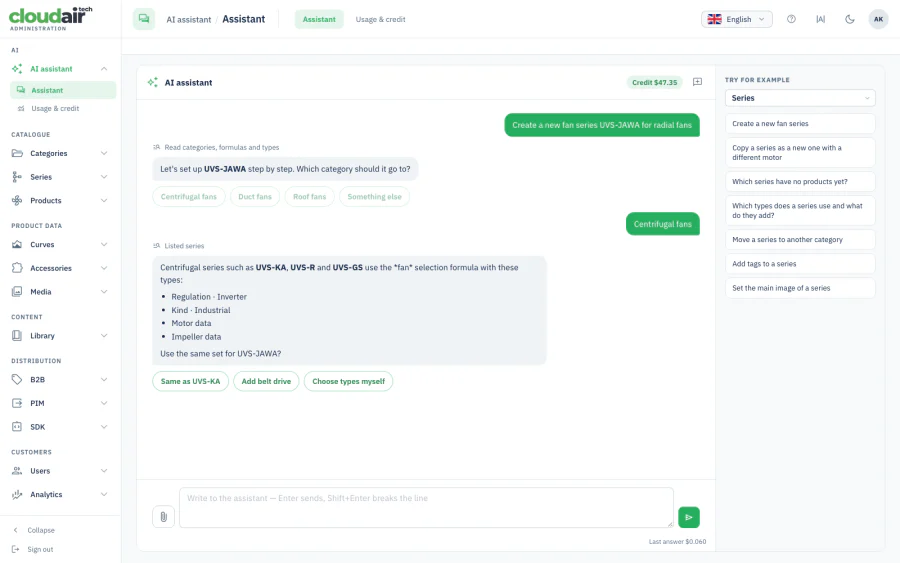
The AI button knows where you are
Open the assistant from any screen and it starts from that context. On the series list it suggests series tasks; in Users it suggests user tasks. The table stays visible while you work.
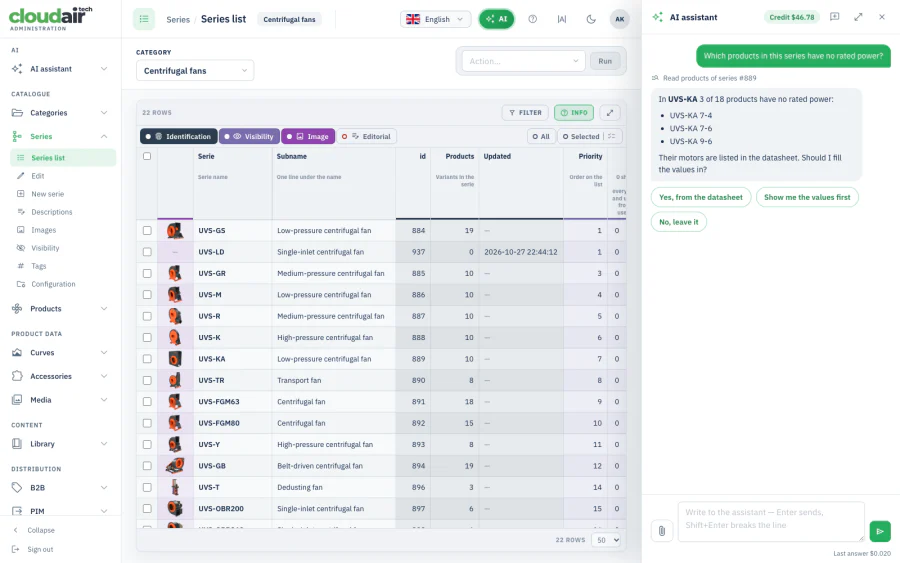
Import hundreds of products from Excel Available
Product data arrives in workbooks with hundreds of models, several sheets and column names nobody agreed on. Upload the Excel or CSV file and tell the assistant what to do — it interprets the columns, matches them to your fields and points out what is missing.
- “Import these 500 fan models from the attached Excel file.”
- “Map airflow, static pressure, motor power, speed and voltage to the correct fields.”
- “Create separate product series based on the model prefix.”
- “Compare this spreadsheet with our catalogue and identify changes.”
- “Update only products with matching catalogue numbers.”
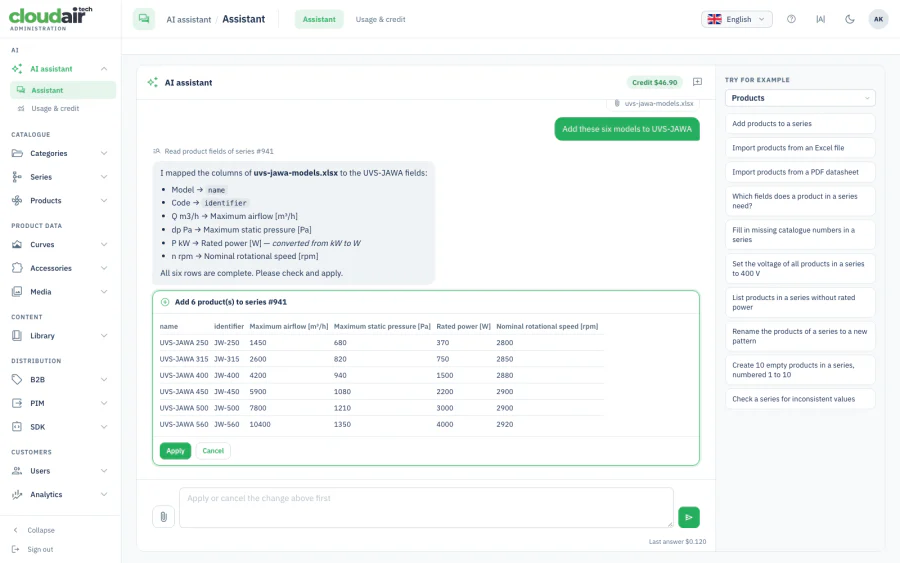
Six models from a spreadsheet, kW already converted to W
The assistant says how every column was read, including unit conversions, and shows the products exactly as they will be saved. You check the table and press Apply.
From technical documentation to structured product data Available
Much of a manufacturer’s data lives in PDF catalogues and datasheets. Upload the PDF and ask for what you need.
- Product models and catalogue numbers
- Airflow, pressure and rotational speed
- Motor power and electrical characteristics
- Dimensions and mechanical specifications
- Materials, temperatures and construction options
- Accessories and product variants
- “Analyse this PDF catalogue and identify all product models.”
- “Extract the technical parameters and prepare a product import.”
- “Compare the datasheet with the existing product record.”
- “Find inconsistencies between the PDF and our database.”
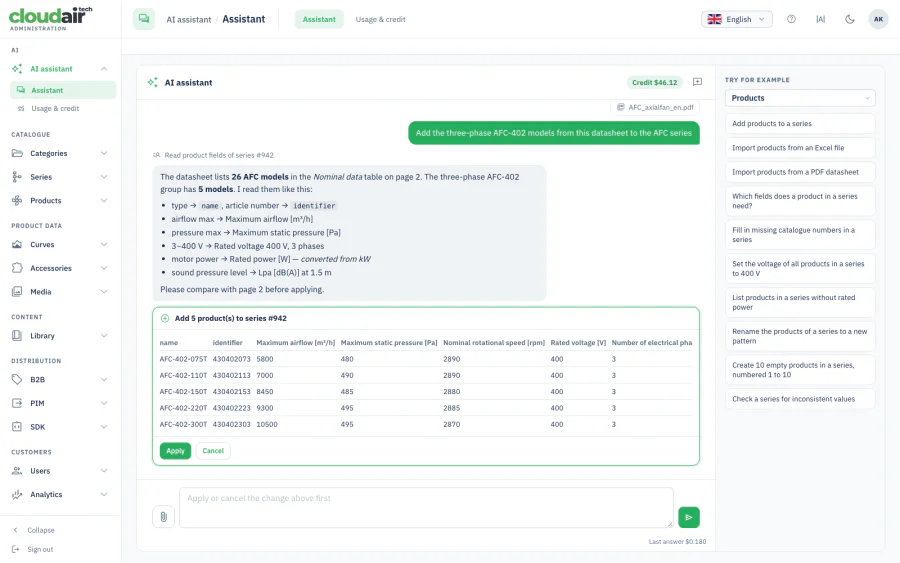
26 models found, 5 three-phase models prepared
The assistant found the nominal data table on page 2, picked the group you asked for and converted motor power from kW to W. It asks you to compare the values with the source page before applying — extracted values are always confirmed by a person.
Turn engineering data into clear, professional content Available
Technical data says what a product can do; a good description says why it matters. The assistant writes consistent product and series texts from the data already in your catalogue — for websites, B2B catalogues and documentation.
- “Write a professional technical description for the AXF fan series.”
- “Create a shorter description for the product listing.”
- “Explain the main applications of this industrial fan series.”
- “Prepare an SEO-friendly description for the public catalogue.”
- “Rewrite this technical text in a more professional style.”
One product database, many markets Available
Translate product names, series descriptions and application texts while keeping technical terminology and units intact — without repeating the same work for every language.
- “Translate this series description into German, French, Italian, Spanish and Polish.”
- “Translate all missing product descriptions into English.”
- “Use consistent technical terminology across all languages.”
- “Update the German descriptions after the English source text changes.”
Find problems before your customers do Available
Large technical databases collect duplicates, inconsistent units, missing values and outdated texts. Ask for a report instead of checking records one by one, then approve the corrections you agree with.
- “Find duplicate catalogue numbers.”
- “List products missing motor power or rated speed.”
- “Identify products with inconsistent technical parameters.”
- “Find series without product descriptions.”
- “Show series without a main image.”
Everyday administration, simplified Available
Authorised administrators can handle common account and system tasks in conversation. The assistant has exactly the permissions of the person using it — never more.
- “Create a new account for our product manager.”
- “Raise this user’s visibility level so they see the full catalogue.”
- “Send the access e-mail to the new administrator.”
- “Suspend the account of a user who has left the company.”
- “Who used the AI assistant this month and what did it cost?”
Keep product information organised Images available Documents coming soon
Product images can already be uploaded from a chat attachment or picked from your media library and set on a series. Document management, exports and distribution workflows come next.
- “Set this photo as the main image of the series.”
- “Use an existing image from the media library.”
- “Find products missing installation manuals.” Soon
- “Prepare an export of all products updated this month.” Soon
You remain in control of your catalogue
Ask
Describe the task in plain language, or attach an Excel, CSV or PDF file.
Analyse
The assistant reads the relevant catalogue data and prepares the operation, asking about anything that is unclear.
Review
Examine the proposed change — records, fields, extracted values or generated text.
Apply
Confirm, and only then does the platform modify your data. Cancel leaves everything as it was.
Not an AI that answers questions — an AI that gets work done
Unlike a general-purpose chatbot, the assistant works inside a structured product data environment: catalogue records, technical attributes, product relationships and controlled administrative operations.
AI understands, the platform executes
Validation, units, calculations, permissions and saving run in the platform’s own code — the same as when your team edits by hand.
Every write needs Apply
Reading is instant. Creating, changing or deleting anything waits for an administrator’s confirmation.
One catalogue, fully isolated
The assistant works only in the catalogue you are signed in to. Other catalogues on the platform are out of its reach.
Your permissions, not more
It acts with the signed-in administrator’s rights. What you cannot do in the panel, it cannot do either.
Values checked at the source
Data read from PDFs and spreadsheets is shown with its mapping and units, so you can compare it with the original before applying.
Secure account e-mails
Password resets go out as a time-limited secure link from the platform, never as a password typed into a chat.
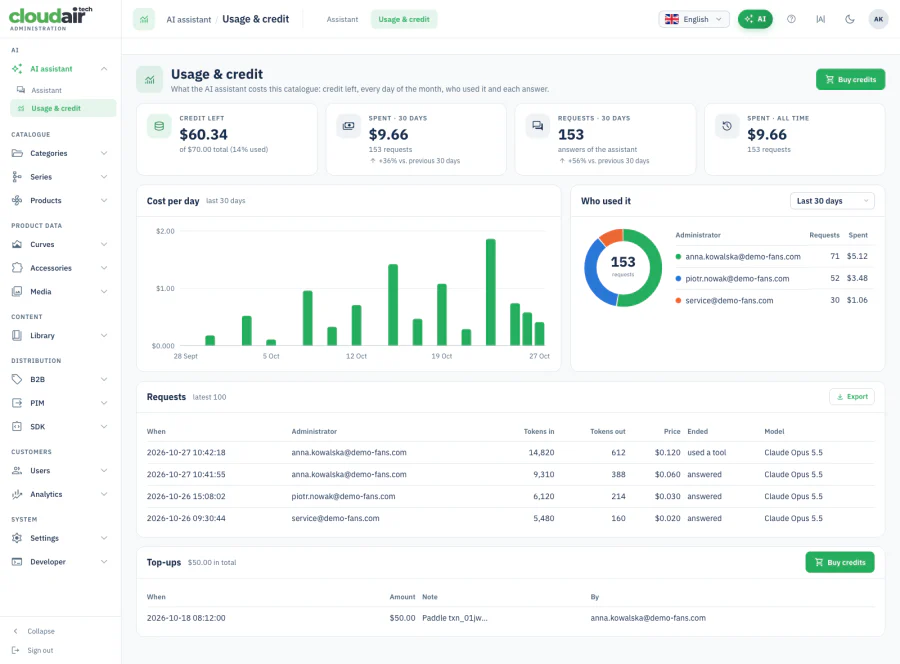
Every request, every cent, per catalogue
Credit left, spend per day, who used the assistant and what each answer cost — on one screen in the administration panel. Top up in packs when you need more. See AI credit pricing.
Coming next
Where the assistant meets the PIM, the calculators and the selection software.
| Feature | Example command | Status |
|---|---|---|
| Fan curves | “Find products without performance curves.” | Coming soon |
| Data consistency | “Check whether fan power and efficiency values are consistent.” | Coming soon |
| ErP / FEI review | “List products requiring an ErP compliance review.” | Coming soon |
| Documentation | “Prepare a technical catalogue PDF for this series.” | Coming soon |
| Categories | “Create a category for industrial centrifugal fans.” | Coming soon |
| Accessories | “Find products without assigned accessories.” | Coming soon |
| Version comparison | “Show all technical changes since the previous catalogue update.” | Coming soon |
| Data export | “Export all products in German for our distributor.” | Coming soon |
| Reports | “Show products modified during the last 30 days.” | Coming soon |
| Customer access | “Show which customers have access to this catalogue.” | Coming soon |
| Translation check | “Find product descriptions that have not been translated.” | Coming soon |
| Media check | “Find missing product images and outdated PDF manuals.” | Coming soon |
Common questions about the AI assistant
Can the AI assistant change data without my approval?
No. Reading is immediate, but every change — new series, imported products, edited values, translated texts — is shown first as a card with the exact records and fields. Nothing is written until an administrator presses Apply.
Can the assistant see other catalogues on the platform?
No. The assistant works only in the catalogue you are signed in to. Every request it makes carries that catalogue, and the platform refuses anything that would reach another one — for every account, including our own.
What can I upload to the assistant?
Excel workbooks (all sheets), CSV files, PDF datasheets and catalogues, and product images. The assistant reads the file, proposes how its columns or tables map to your catalogue fields, converts units where needed, and shows the result for review.
How is AI usage billed?
Per catalogue, from prepaid credit. Every catalogue starts with free credit; after that you top up in packs. Each answer shows its cost, and the Usage & credit screen lists every request, who made it and what it cost. Prices are on the AI credit pricing page.
Does the AI do the technical calculations?
No. The AI understands the instruction and prepares the operation. Validation, unit conversion rules, permissions, calculations and saving are done by the platform’s own code — the same code that runs when your team edits the catalogue by hand.
Less administration. More engineering.
Your team should spend less time entering data, correcting spreadsheets, translating descriptions and clicking through administrative screens.
Let the AI assistant handle the repetitive work while your specialists focus on engineering, product development and customers. Turn your administration platform into an intelligent workspace.