
Dynamically generated technical catalogs
Your product data is already in the PIM. Your catalog should generate itself.
Complete technical catalogs built directly from your product database — descriptions, curves, dimensions, accessories and translations, all from the records that already feed your website and selection software.
Stop rebuilding catalogs by hand
A technical catalog is the one document that needs product managers, engineers, translators and a designer to agree at the same time — which is why a single changed parameter turns into a project.
What one product update means today
- Change the technical tables
- Replace the images
- Redraw the charts
- Update the dimensions
- Check the accessories
- Correct every translation
- Rebuild the page layouts
- Export the new PDFs
Eight jobs, several people, and a catalog that is wrong between the first of them and the last.
What a generated catalog is worth to you
The point is not that a PDF comes out at the end. It is that the work of producing it, and the errors that come with doing it by hand, stop existing.
Weeks of work disappear
A catalog update that used to take days or weeks is a generation run. Most of the work was already done when the product data was entered — the pages are built from it.
Production costs drop
The same information stops being prepared five times — once for the website, once for the PDF, once for the selection software, once for distributors, once per language. It is maintained once and reused.
The catalog is never out of date
A PDF is usually obsolete the moment a parameter changes. The next generated one carries the current figure, because there is no second catalog database to keep in step.
New products launch sooner
Launches wait for documentation far more often than for the product. When the catalog comes out of the data, the gap between “data ready” and “catalog ready” mostly closes.
Whole classes of error vanish
Outdated values, figures copied from the wrong model, inconsistent units, missing translations, old images, wrong accessory assignments, a website that disagrees with the PDF — all of them need a manual step to happen.
Every language at the same moment
One layout, translations from the database. A technical change is made once and reaches every language version of the catalog on the next run.
The hours that stop being spent are designers’ and DTP agencies’ hours, translators’ hours, and the engineering and product-management time that goes into checking what they produced.
One database behind every channel
The most common problem in a technical product company is not missing data. It is the same product described differently in four places. Generating the catalog from the database removes the fourth place.
See the PIM the catalog is generated from and the API and data channels that share it.
Complete sections, not just tables
Ten kinds of catalog page, each assembled from structured records rather than drawn by hand.
Product pages
Series name, descriptions, applications, construction information and product images.
Technical data tables
Parameters for individual models or for a whole product family, in the columns you choose.
Product photography
Main images, alternative views and detail shots, each already assigned to the right series.
Related products
Generated from the relationships stored in the database — the EC version, the ATEX version, the belt drive.
QR codes
Links from the printed page to the current product page, its documentation or the selection software.
Combined performance charts
The operating range of an entire product family on one set of axes.
Individual performance curves
Pressure, power, efficiency, acoustic and speed curves, generated per model.
Dimensions
Technical drawings combined with the dimensional table that belongs to each model.
Mounting accessories
Connectors, guards, silencers, feet and isolators, matched to the product they fit.
Electrical accessories
Controllers, thermostats, sensors, contactors and inverters matched by motor type, voltage, power and phase.
Design the layout once, apply it to thousands of products
The template is defined with a designer, the way it always was. From then on the same visual rules apply across the entire range, so consistency is not something anyone has to maintain page by page.
Multi-language catalogs without rebuilding the layout
The layout stays the same and only the content changes, so a market is not a new design file that slowly drifts away from the others. A technical correction is made once and propagates into every language version.
See what can be generated automatically
Fragments from a catalog running in production — twenty-one pages for Venture Industries’ AFC axial duct fan range, published by the manufacturer. This is output, not a mock-up.
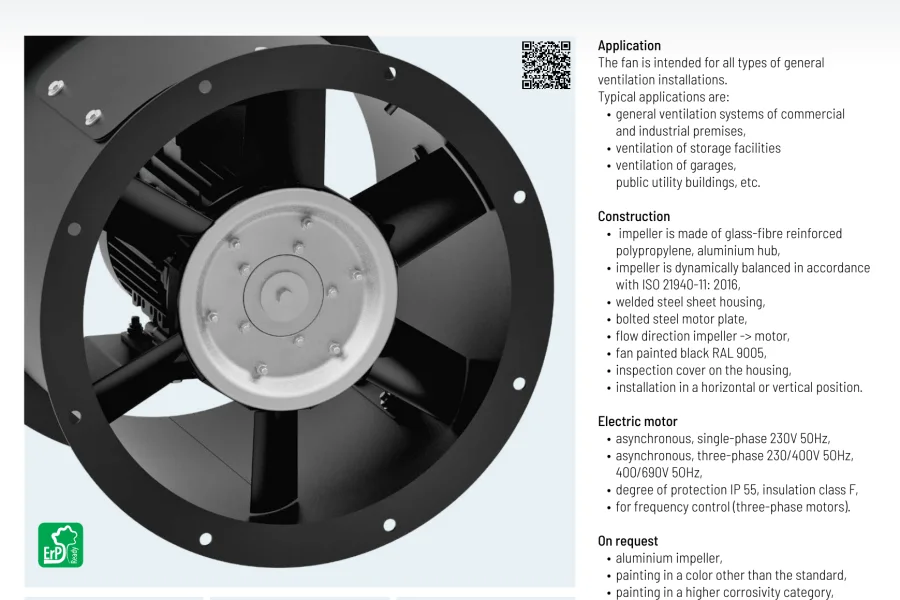
Product page
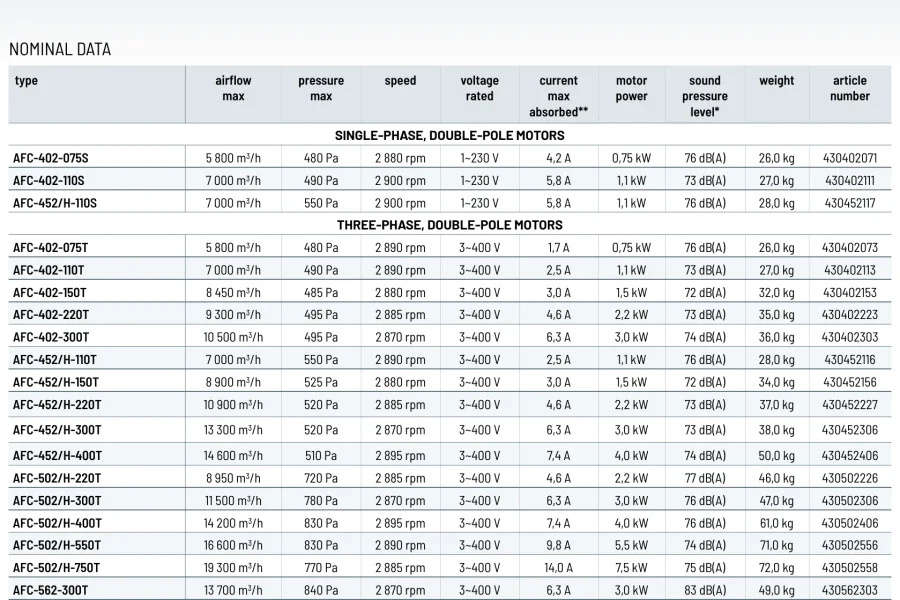
Technical data tables
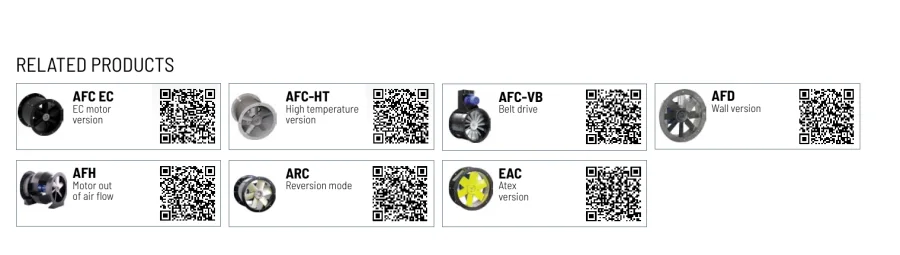
Related products and QR codes
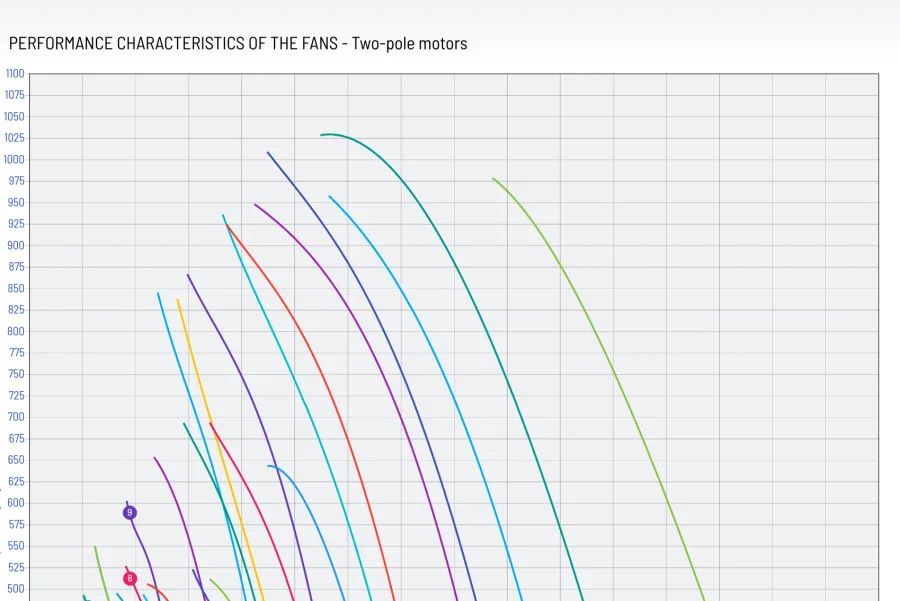
Combined performance charts
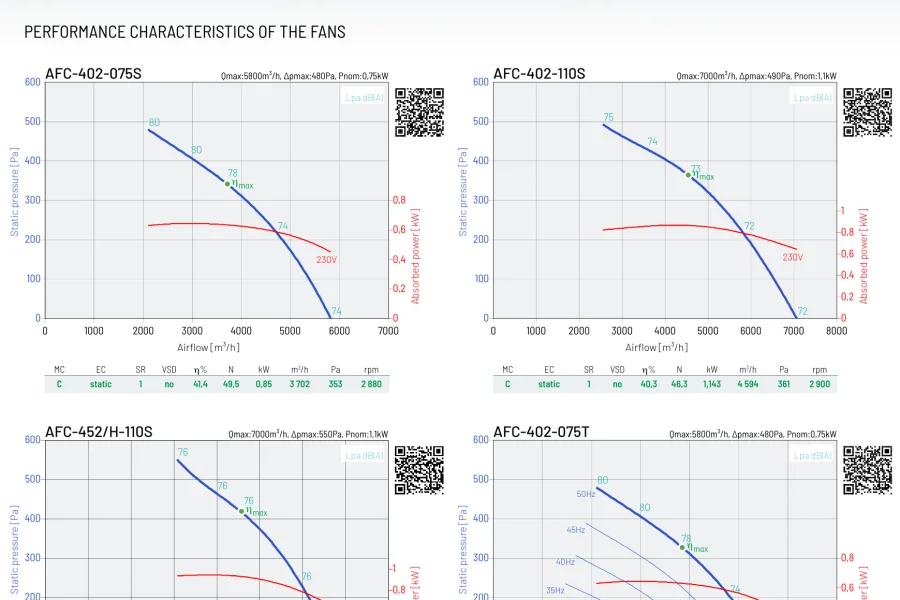
Individual curves
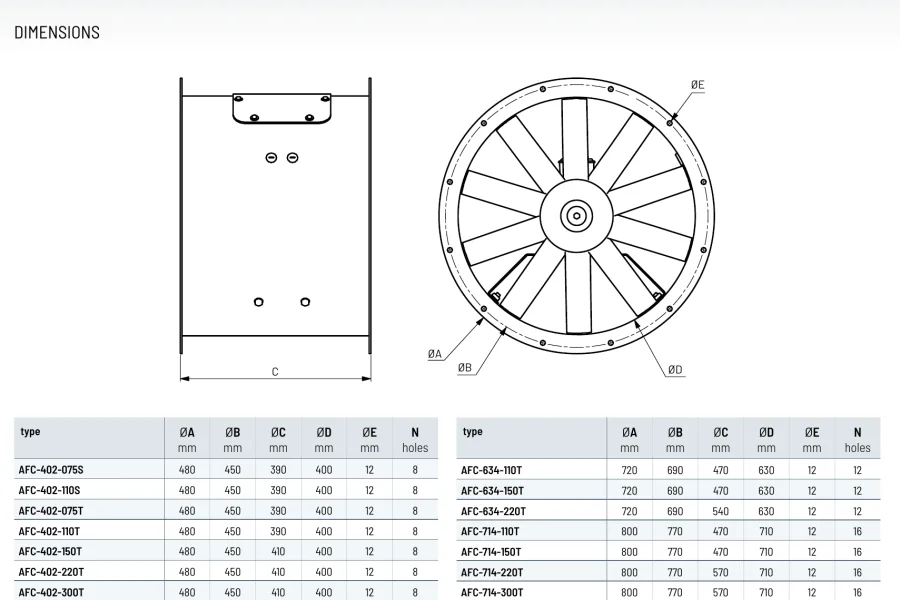
Dimensions
Regenerate instead of redesign
When a catalog changes, you should not have to rebuild it. Update the source data, generate the catalog again. That is the whole idea.
Common questions about generated catalogs
What exactly is generated — the whole catalog or just the tables?
The whole document. Product introduction pages with photography and descriptions, related products with QR codes, nominal data tables, family performance charts, an individual chart per model, dimension drawings with their measurement tables, and mounting and electrical accessory sections. Page numbering, headers and footers come with it.
What happens when a specification changes?
You change it in the product record and regenerate. Every table, chart and accessory list that uses that value is rebuilt from the current data. There is no catalog spreadsheet to update separately and no layout to repair afterwards.
Are the catalog curves the same ones the selection software uses?
Yes — one dataset. The curve printed in the catalog is drawn from the same measured points the selection engine calculates an operating point on, so a printed chart and an online selection can never disagree.
Can we get the catalog in several languages?
The same layout generates in every language your catalog holds. Product names, descriptions, parameter labels and technical notes come from the multilingual content in the PIM, so there is no separate InDesign file per market.
Do we still need a designer?
Not for the repeatable work. The layout is defined once and applied to every series, so a designer is needed for the template and the cover, not for rebuilding dozens of pages each time a motor range changes.
Does this only work for fans?
No. It works for any product whose catalog is driven by engineering data — air handling units, coils and heat exchangers, silencers, diffusers, pumps, motors, gearboxes and other configurable technical equipment. Fans are simply where most of our catalogs run today.

One product database. Always-current catalogs.
Less manual work, lower production cost, faster updates, consistent data in every channel and every language. Twenty minutes is enough to see what your own data would generate.