
Product Data API for HVAC manufacturers
Your catalog, inside your partners' systems — a separate key, assortment and format for every company you share it with.
Distributors want a file. Integrators want an API. Each of them wants a different slice of your range, in their own language, and none of them should see your whole catalog. CloudAir gives every recipient their own door into the same database — and a log of everything that came through it.
GET /v1/products?serie=18&v.phase=1
X-Api-Key: ca_api_3f9a…c21d

{
  "data": [
    {
      "id": 4812,
      "name": "LD 400-4",
      "variables": {
        "powerRated": "90",
        "voltageRated": "230"
      },
      "tags": [ "Centrifugal" ]
    }
  ],
  "meta": { "count": 20, "limit": 20 }
}
The same database, two ways to hand it over
Both read the live product records. Need the catalog to select a product rather than list it? That is the HVAC selection API. Neither needs anyone on your side to prepare anything by hand.
REST API — they call you
The partner's own software asks for categories, products, curves or a fan selection and gets JSON back in the moment. Right for configurators, webshops and selection tools that must always show what you have today.
Data channel — they take a file
A CSV, XML or JSON file shaped exactly for one recipient: their products as rows, their fields as columns, their language, their decimal separator. Downloaded from the admin or pulled from a live link whenever they need it.
Every partner gets their own key — and their own catalog
A key is issued to a company, not to your catalog as a whole. Add as many as you have partners; each one is edited, limited, logged and revoked on its own.
Who it belongs to
Company, country, contact person, phone and a technical e-mail for the person who will actually wire it up — plus a free note on who asked for it and why.
Which assortment
The whole catalog, or chosen categories, chosen series and single products. Chosen categories narrow the series; chosen series and single products add up.
Up to which level
An access level caps how deep the key reaches — public-only at one end, your full internal depth at the other, with the steps your catalog defines in between.
In which languages
All languages or a chosen set. The key reads product texts only in the languages you tick, so a regional distributor never receives content for markets that are not theirs.
What no key ever sees
Prices and internal notes are never part of the API, whatever the scope says. Outside the scope the answer is 404, not 403 — a partner cannot map what they are not allowed to reach.
For how long
Every key carries an end date — it is required when the key is created — and an active switch that takes it out of service immediately without deleting its history.
Issued in a minute, controlled for its whole life
The key itself is shown once, at creation, and never again — what stays behind is everything you need to keep it in check.
Daily limit
A call ceiling per key, reset at midnight, so one partner’s runaway loop cannot flood the catalog for everyone else.
Addresses
A key can be bound to your partner’s server addresses, and single addresses can be blocked outright.
Server key or browser key
A server key is a secret and is refused from web pages; a browser key lists the websites it may be called from. One key is one kind.
Shown once, replaced in a second
The key is visible only when it is issued. A leaked one is replaced at once — the scope, dates and limits stay, the old secret dies.
Every call on record
When, result, HTTP status, endpoint, address and calling program — refusals included, so you see the attempts and not just the successes.
A file built for one recipient, in five decisions
A channel is set up the way you would explain it to the person asking for it: who it is for, which products, which data, how it is written, and how it gets to them.
Channel — who it is for, and how the file comes out
A name you will recognise a year from now, a note on who asked for it, and the output format: CSV, XML or JSON.
Which products — the rows of the file
All categories or chosen ones, all series or chosen ones, capped at an access level. The same assortment logic as an API key, decided per recipient.
Which data — the columns of the file
Pick the product fields, the texts — name, subname, overview, description — and the languages. One language or several, all of them or a chosen set.
Output setup — how the file is written
Delimiter, byte order mark and decimal separator for CSV; root and product element for XML; array, object by SKU or JSON Lines for JSON. Languages as columns or one row each, photos in one column or separate ones, technical data as its own columns or a single JSON column, empty values left blank or skipped entirely.
Delivery — where it goes and how long it lives
Generated on demand, downloaded from the admin or pulled from a live link, valid between the dates you set and restricted to the addresses you allow.
You see the file before the recipient does
Preview before it goes
A running count of how many rows and columns the settings produce, how the header starts, and a preview of the actual products — the one place where a wrong decision shows itself.
Versioned when columns change
Change what the file contains and the channel saves a new version, with a reminder that the recipient's import needs to hear about it. Their parser never breaks silently.
Every read on record
A live link keeps the same log as a key — when it was read, from which address, in which format, by which program, and whether it was refused as expired, blocked or unknown.
Eleven endpoints, and two dictionaries that make them readable
Series and products carry keys, not texts. Fetch the dictionaries once, in the language you show, and keep them.
Who am I
What this key may read — the scope, the level and the languages, straight from the key itself.
Categories
The category tree as the key sees it, nothing above or outside its scope.
Series & One series
The series list, and a single series with the technical data that belongs to the whole family.
Products & One product
The product list with paging and filters, and a single product with its full technical data.
Product curves
Performance curves point by point, for drawing or for calculating against them.
Select fans
A duty point in, matching fans out — the same selection engine your own catalog runs on.
Variables & Tags
The dictionaries: powerRated becomes "Rated power", symbol P, unit W; Phase-1 becomes "Single-phase". Both can return only what the key's part of the catalog actually uses.
Whole catalogue
Everything the key may see in one response, for integrators who would rather keep a local copy.
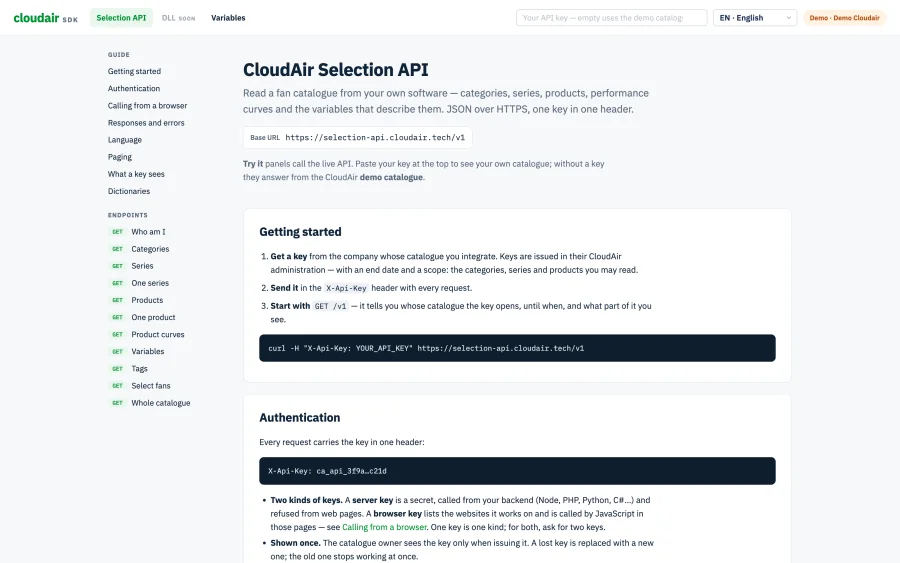
Filter the product list on any variable the catalog knows — ?v.phase=1, ?min.powerRated=500&max.powerRated=2000 — with the keys listed in the variables table.
Set up where your product data already is
Keys and channels are part of the same admin platform that holds the catalog — no second system, no export scripts, no developer in the loop to add a partner.
Product Information Management
The database every key and channel reads from: technical data, curves, files, translations.
Admin platform
Where keys are issued, channels are built and both are logged — alongside products, media and history.
The documentation your integrator will ask for
Getting started, authentication, calling from a browser, responses and errors, language, paging, what a key sees and every endpoint with a Try it panel that calls the live API — written for the developer on the other side, not for a brochure.
Next to it sits the dictionary: every variable the catalog knows, with its key, name, symbol, unit, step and allowed values, searchable and filterable.
Open the SDK documentation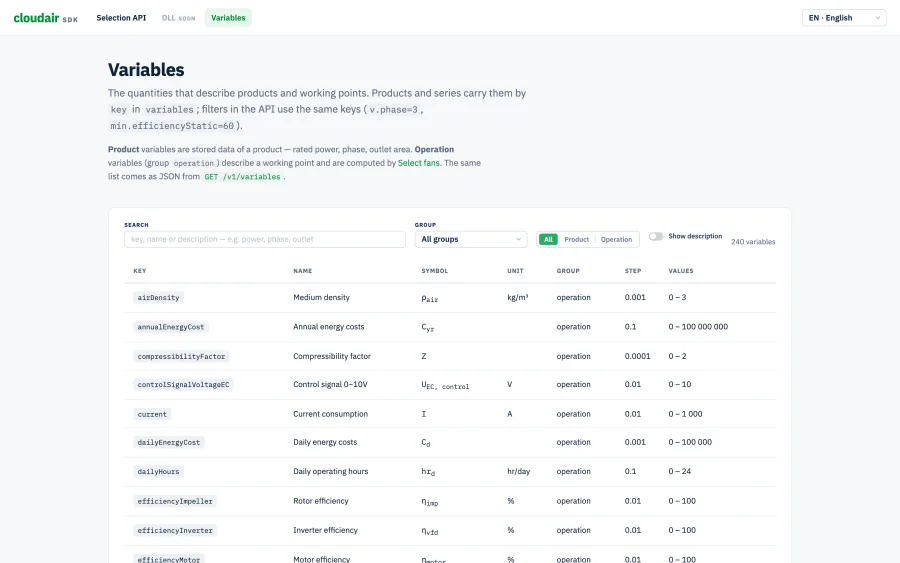
Common questions about the API and data channels
Can two companies see different parts of the same catalog?
Yes — that is the point. Every company gets its own key, and each key carries its own scope: the whole catalog, or chosen categories, series and single products, up to an access level and in chosen languages. Anything outside that scope does not exist for the key — it answers 404, not 403, so a partner cannot even tell what they are not allowed to see.
What can a partner's software actually do with the API?
Read your category and series tree, list and filter products on any technical variable, pull a single product with its full technical data, fetch performance curves, and run a fan selection against a duty point. Two dictionaries turn stored keys into readable labels, so the partner can build filters and tables in their own language.
Does the API expose prices?
No. Prices and internal notes are never part of the API, whatever a key's scope says. Commercial data stays in the admin platform.
What formats can a data channel produce?
CSV, XML or JSON. Each has its own options — delimiter, byte order mark and decimal separator for CSV, root and product element for XML, array, object by SKU or JSON Lines for JSON — and languages, photos and technical data can each be laid out as separate columns or packed into one.
How do we stop a key that leaked?
Rotate it or delete it from the admin platform and it stops working at once. Rotating keeps the scope, dates and limits and only replaces the secret, so the partner changes one line and carries on. A key is also bound by an end date, a daily limit, allowed and blocked addresses, and the websites it may be called from.
Do we see who is calling the API?
Every call lands in the key's log — when, the result, the HTTP status, the endpoint, the address and the calling program — refusals included. Data channels keep the same record for every read of a live link.
Where is the technical documentation?
At sdk.cloudair.tech — authentication, paging, errors, every endpoint with live examples, and a filterable table of every variable the catalog knows.
Pricing scoped to how far your data travels
How many partners, how much of the range each of them sees, and whether they call the API or collect a file — tell us how you need to share your catalog and we will put together a concrete quote.
Get a Quote
Let's talk about who needs your data
No sales deck, no pressure — just a 20-minute meeting to map which partners need what, and which of them should get a key and which a file.