
Custom silencer selection software for manufacturers
We design and build custom silencer selection software for HVAC and acoustic product manufacturers.
Your products, your acoustic data, your construction rules and your brand — in one online selection program. Select, calculate, optimize, price, generate drawings and create technical datasheets automatically.
From duty point to a priced, drawn silencer
A splitter silencer designed end to end: inputs, the 3D model updating with every change, acoustics by octave band, dimensions, materials and cost — and the optimizer searching for the best package.
Silencer selection is still a spreadsheet job
Every enquiry goes through the same hands: attenuation tables, a pressure-drop check, a sketch for the drawing office and a separate cost estimate. A selection program turns that queue into one calculation your customers can run themselves.
Faster answers to enquiries
The engineer or the customer gets a calculated, drawn and priced silencer in minutes instead of waiting for the technical department.
One method for everyone
Sales, engineering and distributors select with the same formulas and your rules, so two people never quote two different silencers for one duct.
Fewer drawing-office hours
Dimension drawings and the 3D model are generated with the selection, ready for the offer and for production.
Cost known at selection time
Weight and material cost come straight from the geometry and your price list, so an attractive design is also a profitable one.
Specified more often
Designers who can size your silencer on your website put your product into the specification — and your datasheet into the tender.
Your engineering, documented
Splitter types, materials, end profiles and limits live in one program instead of in a few people’s heads and spreadsheets.
We build silencer selection software for manufacturers
This is not generic software that you adapt to your silencers. We build the program around your products, acoustic data, dimensions, materials, manufacturing rules and pricing — and it runs under your brand.
Custom silencer selection software development
From engineering calculations and the product database to the user interface, 3D geometry, pricing and PDF generation, CloudAir develops the complete selection platform. We build HVAC silencer and attenuator selection software for manufacturers of rectangular splitter silencers, circular duct silencers, sound attenuators and other acoustic HVAC products — silencer sizing and design software your engineers, distributors and customers can use online.
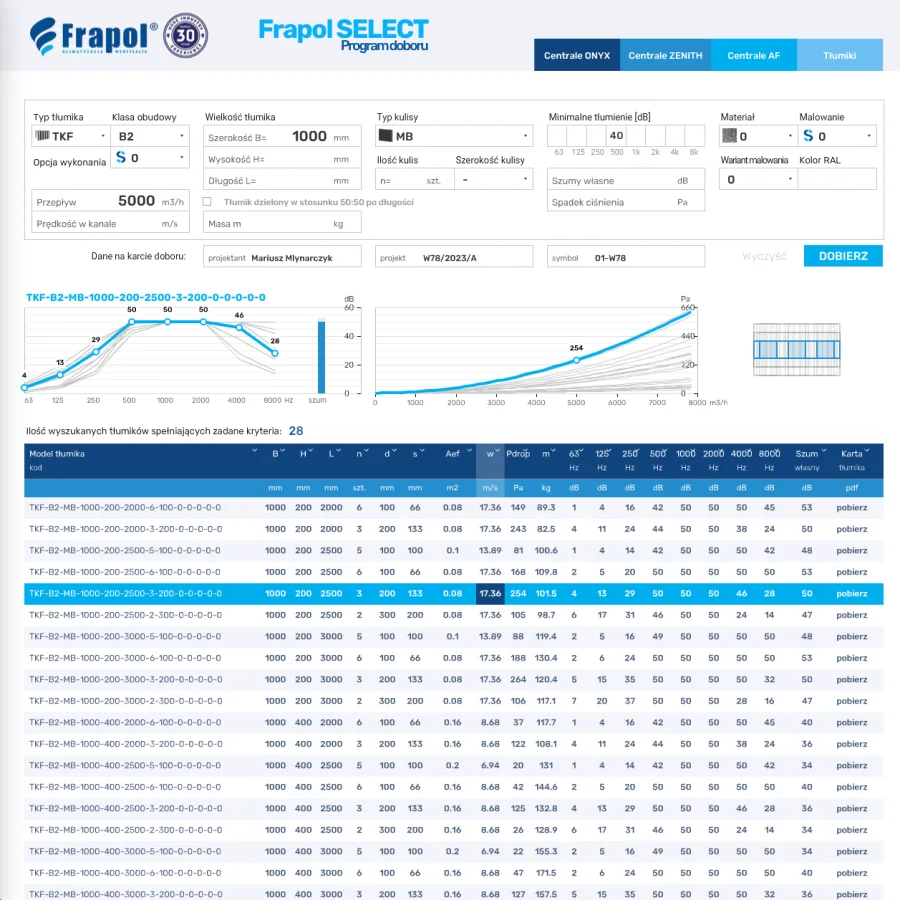
Silencer selection software already built for Frapol
CloudAir has already developed production silencer selection software for Frapol, a manufacturer of duct and rectangular silencers: product selection by required attenuation, acoustic performance band by band, pressure drop curves and automatic technical datasheets — in use by their customers today.
- Selection by silencer type, size, airflow and minimum attenuation
- Every matching model listed with octave-band attenuation, flow noise and pressure drop
- A branded PDF datasheet for each selection
Designer, optimizer, selections and comparisons
Four screens cover the whole job: build any silencer in the designer, let the optimizer find the combinations that meet a requirement, keep every selection with its revisions, and compare the candidates side by side.
Designer — you create the silencer
The customer builds any silencer from scratch: its geometry — casing, number, thickness and length of splitters, air gaps — the shape of the splitters with inlet nose, outlet tail and wedge angle, the materials, sheets, wool and flanges. Every change gives the acoustics, pressure drop, 3D model, drawings, weight and price at once.
Optimizer — it finds the combinations
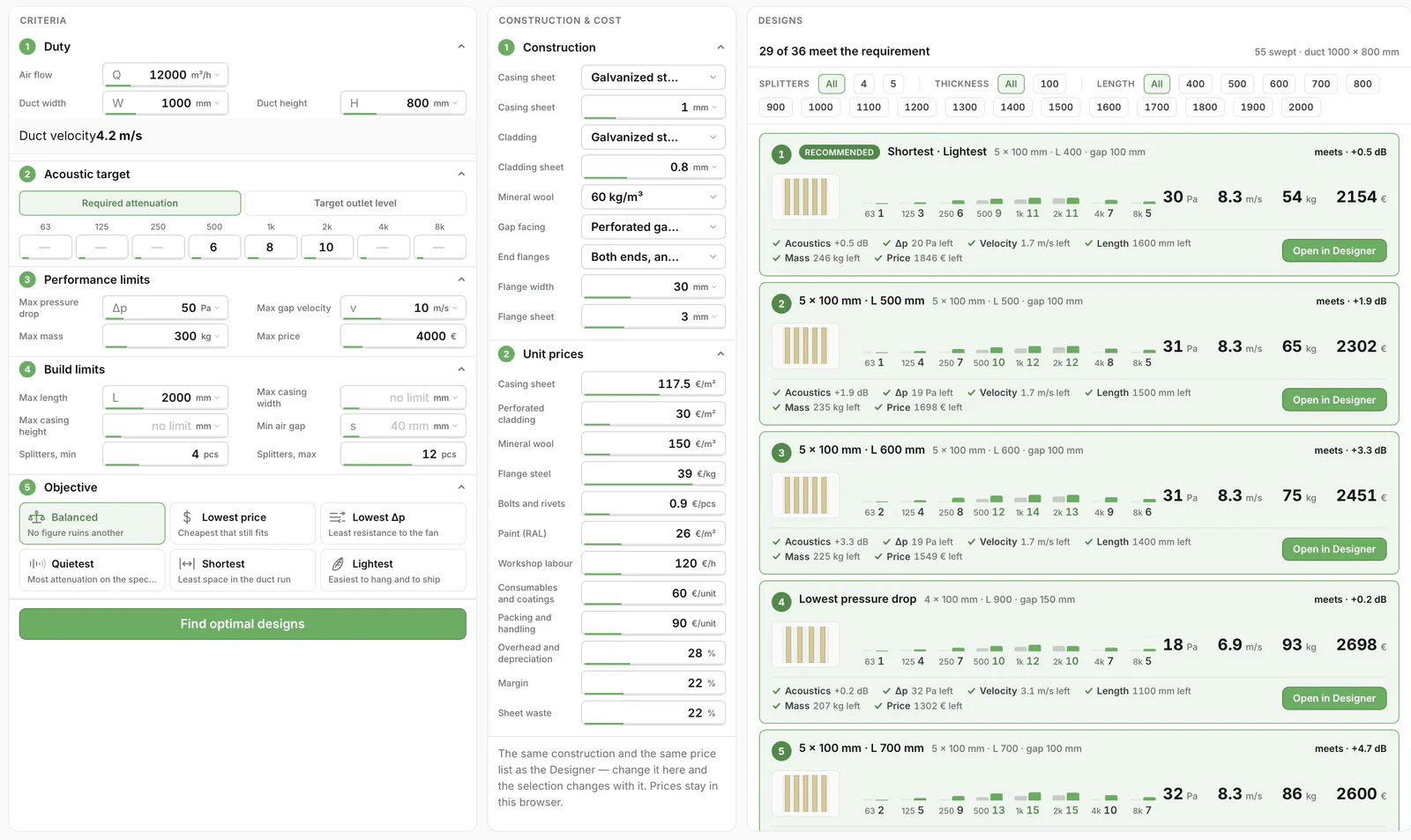
The customer gives only the requirement: the duty, the attenuation needed or the target outlet level, and the limits for pressure drop, gap velocity, size, weight and price. The optimizer analyses the combinations of your range and returns only those that meet every condition, ranked — one click opens any of them in the designer.
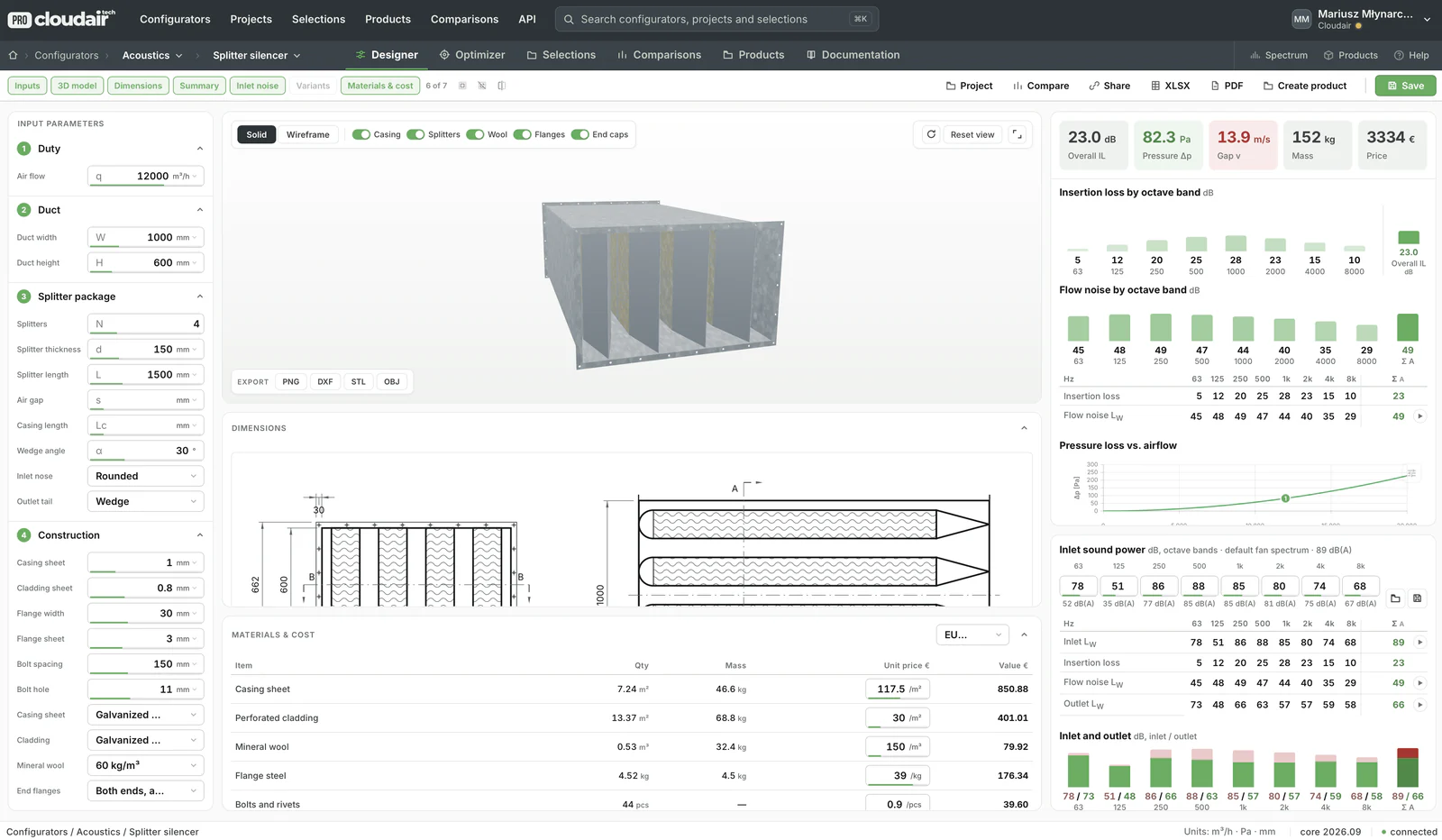
Designer — inputs on the left, the live 3D model, drawings and costing in the middle, acoustic results on the right; every figure recalculated the moment a value changes.
One form defines the whole silencer
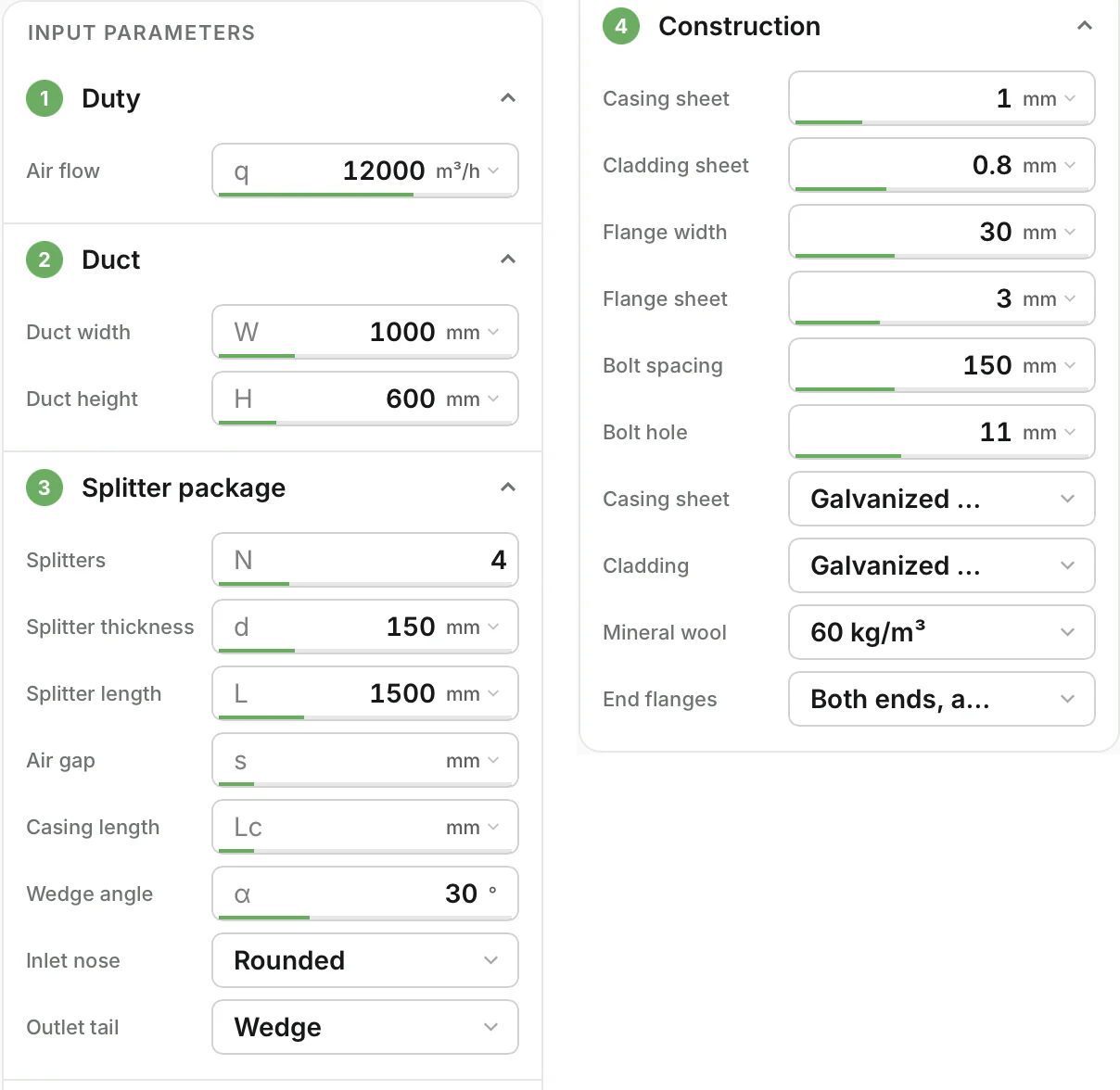
In the designer the customer creates the silencer itself: its geometry, the shape of the splitters and the materials it is made of. Everything sits in four short groups on the left; each field carries its unit and its limits, and every change recalculates the whole design at once.
- Duty — the airflow, in the unit the customer works in
- Duct — width and height of the duct the silencer fits
- Splitter package — number, thickness and length of splitters, air gap, casing length, wedge angle, inlet nose and outlet tail
- Construction — casing and cladding sheet, flange width and sheet, bolt spacing and hole, materials, wool density, end flanges
The lists and limits are yours: only the splitter thicknesses, materials and options you actually make.
The result, the moment a value changes
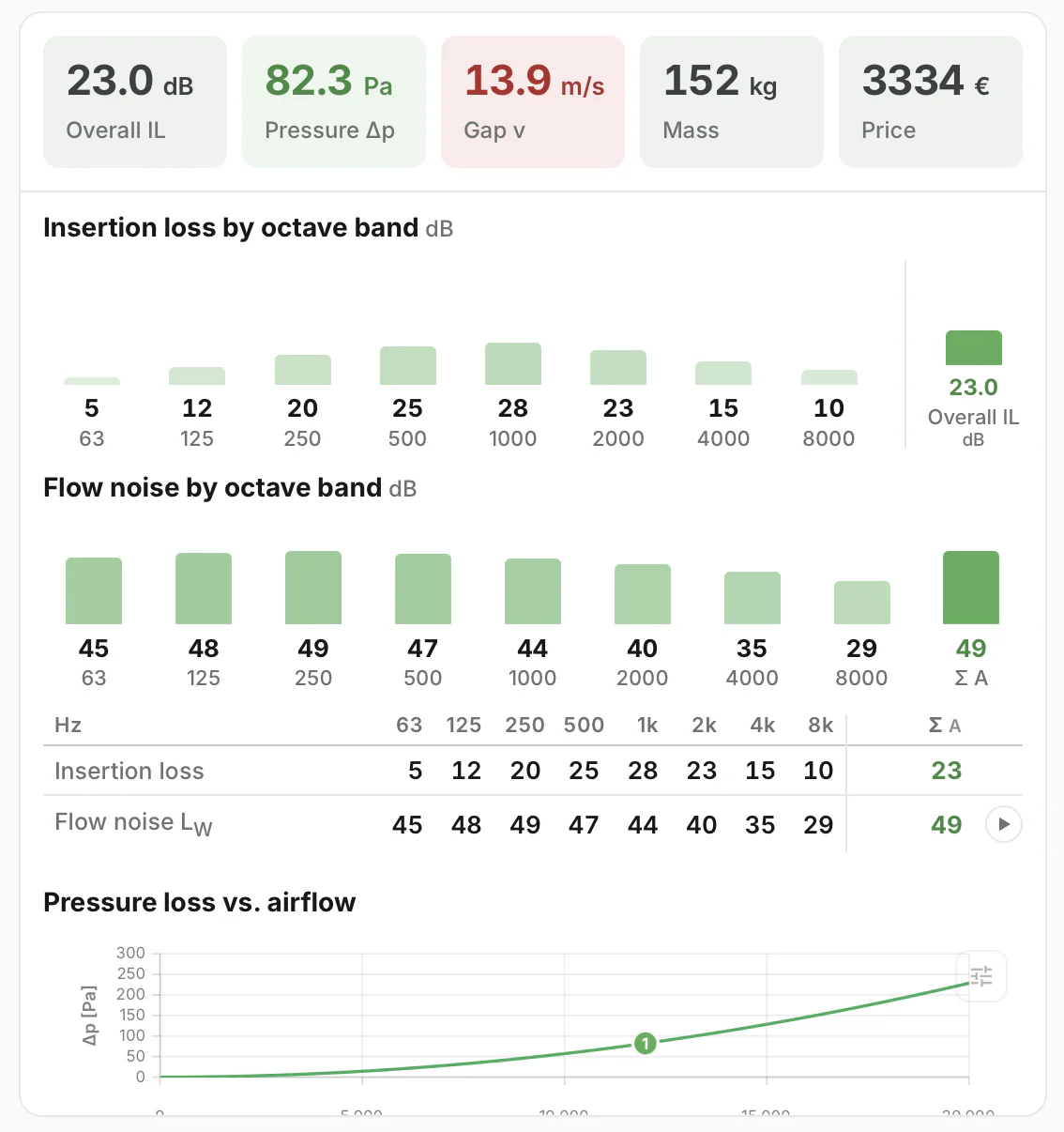
The key figures of the design sit at the top of the results panel, with values outside your limits marked in red — so the customer sees at once whether the silencer works, fits and pays.
- Overall insertion loss, pressure drop, gap velocity, mass and price
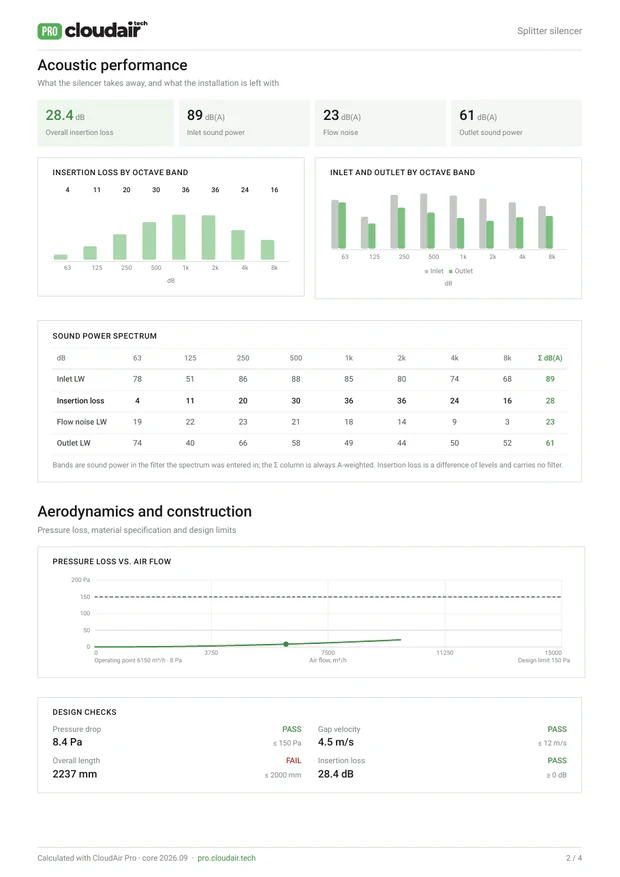
- Insertion loss and flow noise by octave band, as bars and as a table
- Pressure loss against airflow, with the duty point marked on the curve
- A warning as soon as a figure leaves the limits — gap velocity, pressure drop, length
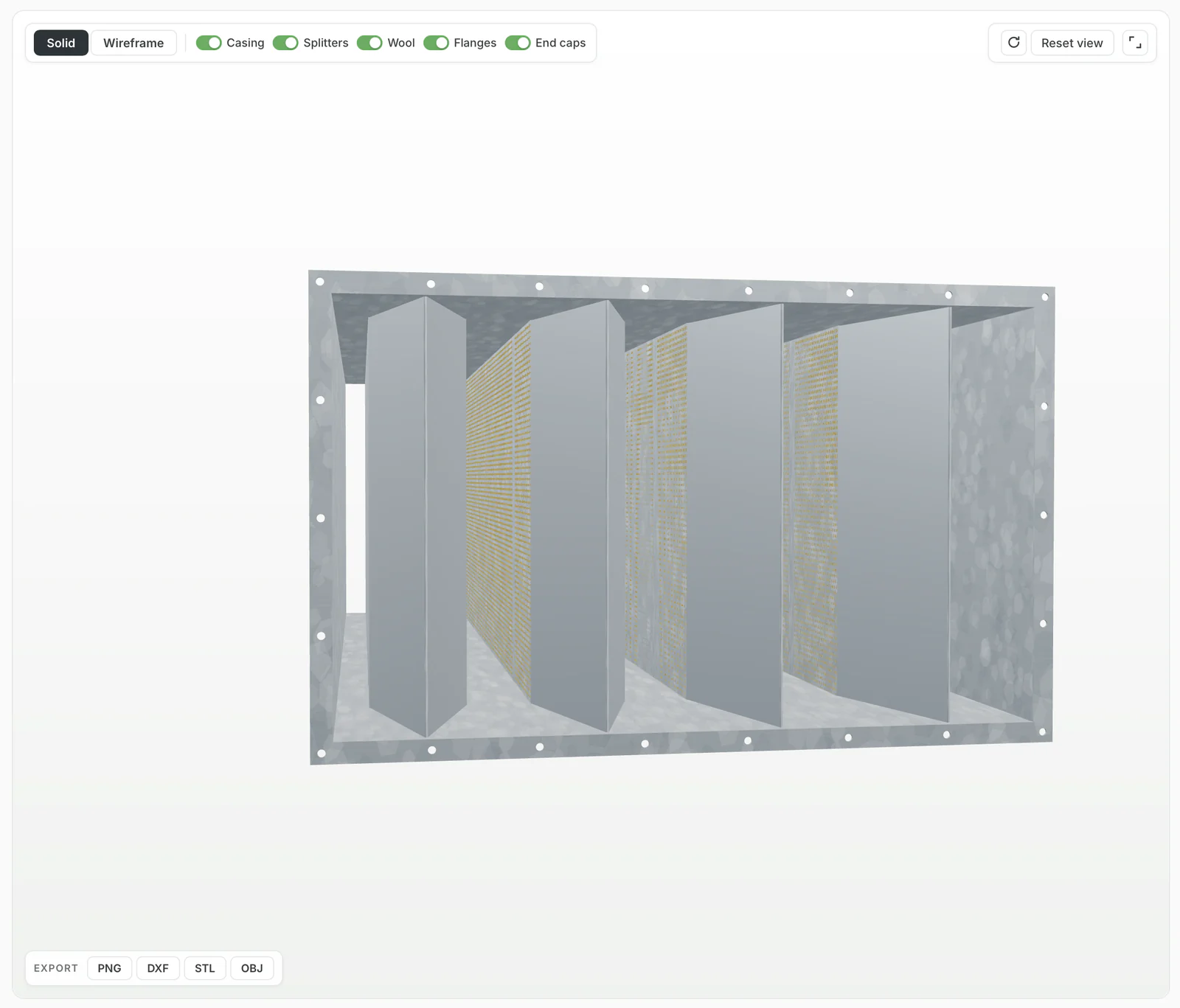
A 3D model of every design, rebuilt on every change
Change the number of splitters, their thickness, the length, the nose or the tail — the model is rebuilt at once from the same geometry the calculation uses, so what the customer sees is exactly what gets calculated and made.
- Solid and wireframe views, free rotation and zoom
- Casing, splitters, wool, flanges and end caps shown or hidden one by one
- Galvanized sheet, perforated cladding, mineral wool and bolt holes as they are built
- Export to PNG, DXF, STL and OBJ for BIM, offers and production
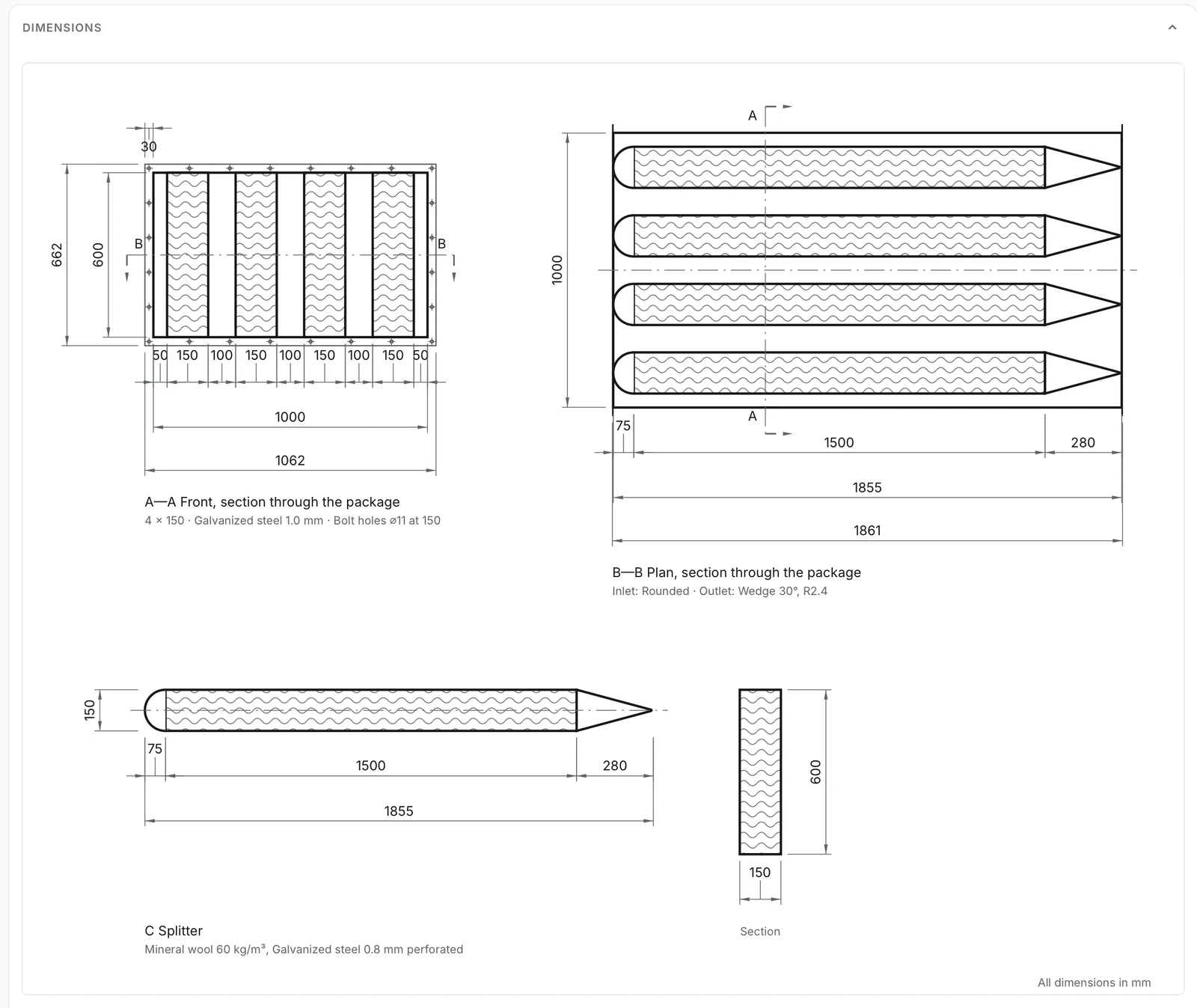
Dimension drawings generated, not drawn
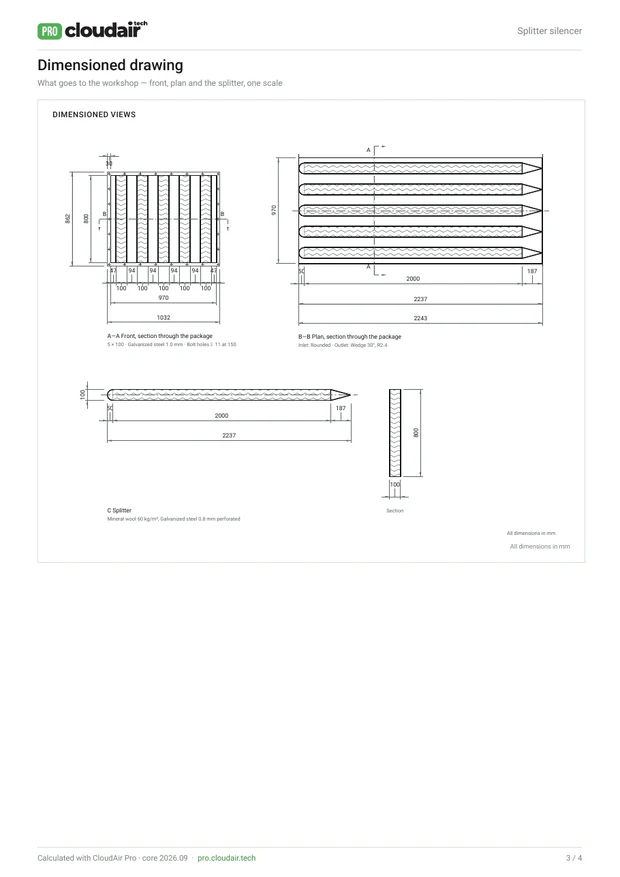
Each selection produces its own technical drawing, dimensioned from the design rather than copied from a catalog page — ready for the offer, the approval and the workshop.
- Front section A–A with splitter and air-gap spacing
- Plan section B–B with the inlet nose and outlet tail profiles
- Splitter detail, overall casing with flanges and bolt-hole pitch
- Material, sheet thickness and wool density written on the drawing
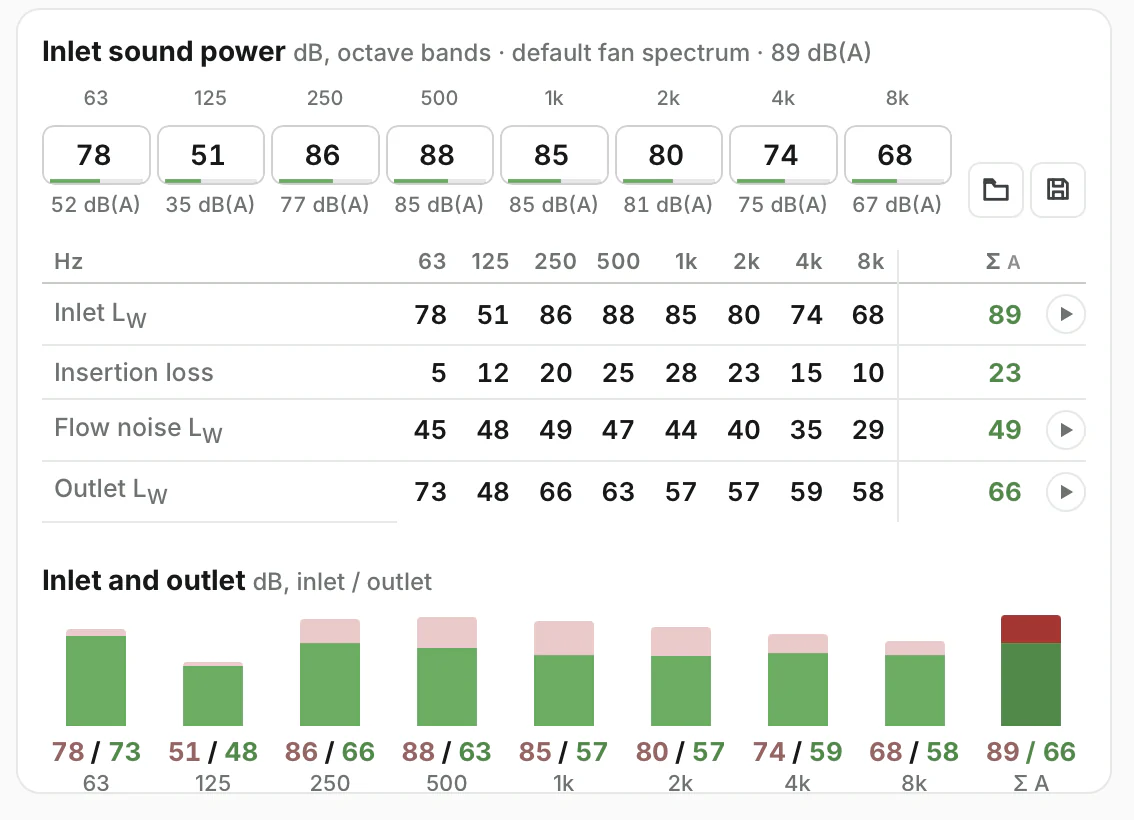
Octave-band acoustics from the fan to the room
The calculation follows VDI 2081 Part 1 for splitter silencers, verified against the worked example in VDI 2081 Part 2. The fan spectrum goes in, the attenuated and flow-noise-corrected spectrum comes out — band by band, so the customer sees where the silencer works, not only one number.
- Inlet sound power from the fan spectrum, a library or the customer’s own values
- Insertion loss in eight octave bands from 63 Hz to 8 kHz
- Flow-generated noise from the air-gap velocity
- Outlet sound power band by band and as one figure in dB(A)
The engineering core is public: try it in the free splitter silencer designer before we build yours.
VDI 2081-1, equations 42 and 44: loss coefficient from the free-area ratio and the length-to-hydraulic-diameter ratio, at the duct approach velocity.
VDI 2081-1, equation 49: sound power generated in the air gaps from the gap velocity, added to the attenuated inlet spectrum.
Where you have laboratory data for your splitter types, it replaces the calculated values for your range.
Weight and material cost of every unit
Quantities are taken from the geometry of the design and priced with your own list, so each selection carries its weight, its manufacturing cost and its selling price — and you decide who sees what: full costing for your team, a list price for distributors, no price at all for designers.
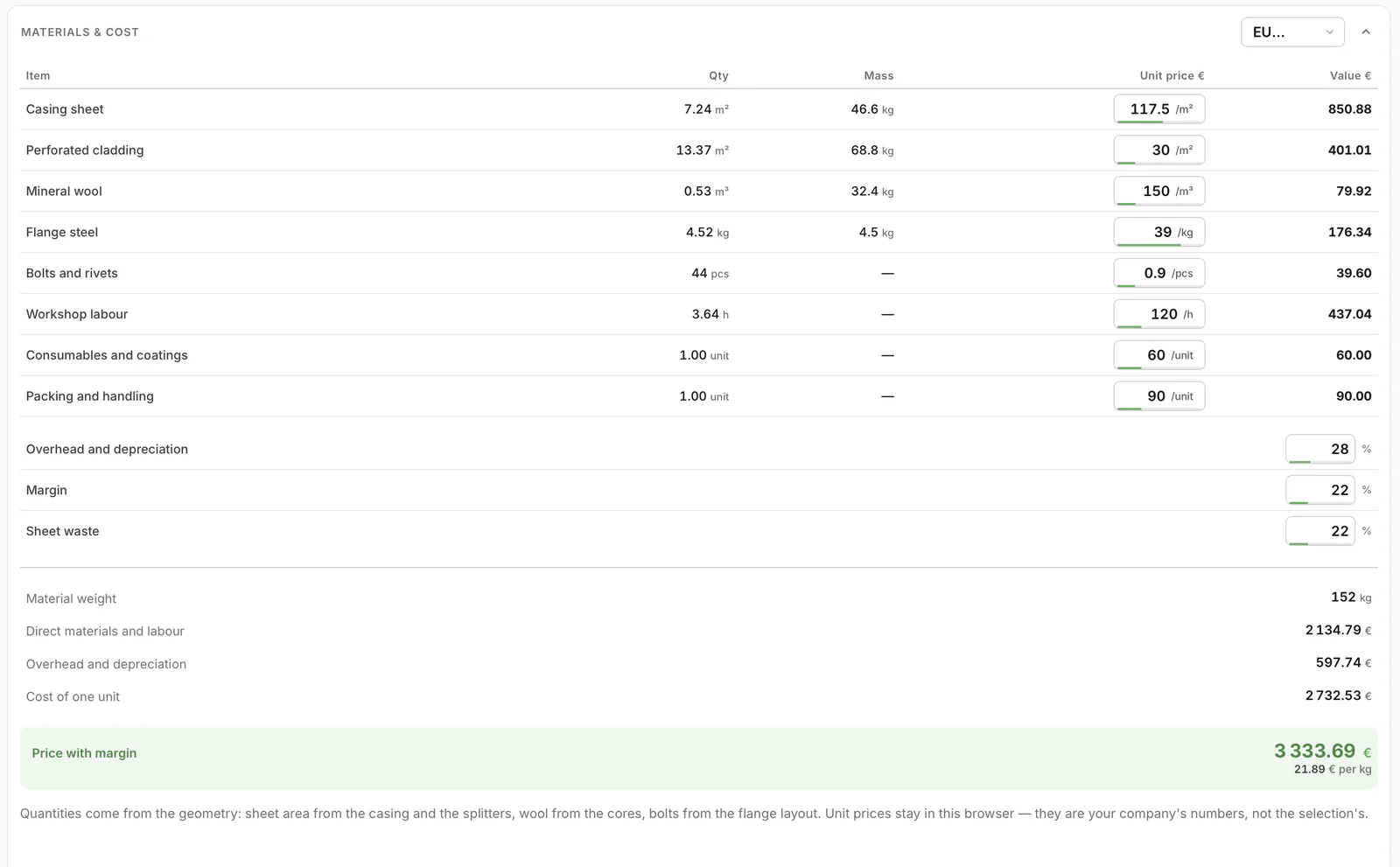
Quantities from geometry
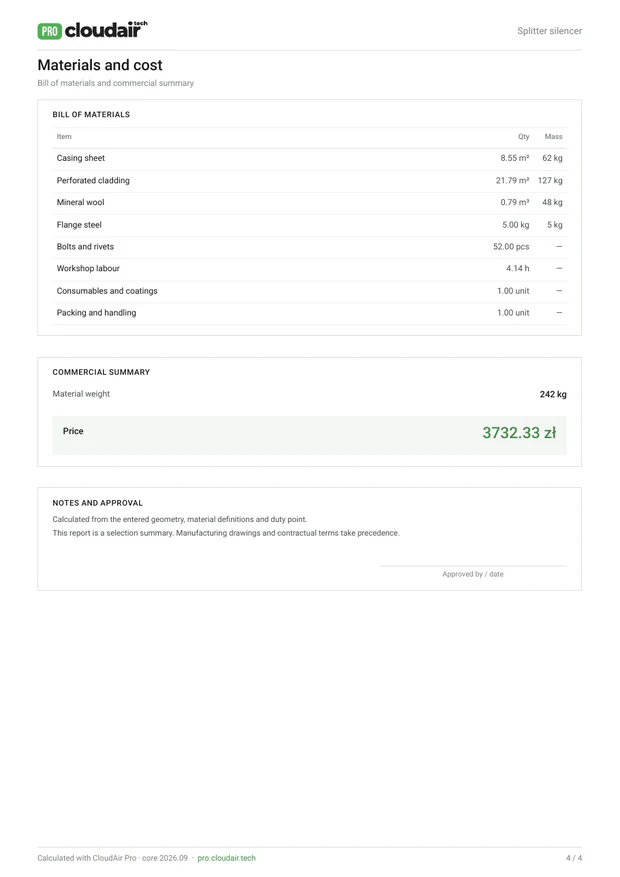
Casing and cladding sheet in m², mineral wool in m³, flange steel in kg, bolts and rivets from the flange layout.
Your price list
Unit prices for every material, workshop hours, consumables, coatings, packing and handling — your numbers, in your currency.
Overhead, margin, waste
Your overhead and depreciation, margin and sheet-waste percentages applied to every design.
Weight and price
Total weight for transport and suspension, cost of one unit, price with margin and price per kilogram.
Give it the requirement, get the combinations that meet it
The designer builds one silencer; the optimizer works the other way round. Instead of trying packages one by one, the customer states the duty, the attenuation needed in each band or the target outlet level, and the limits — pressure drop, gap velocity, length, casing size, weight, price. The optimizer analyses every combination of splitter count, thickness, length and air gap in your range and returns only those that meet all the conditions, ranked by what matters: balanced, lowest price, lowest pressure drop, quietest, shortest or lightest.
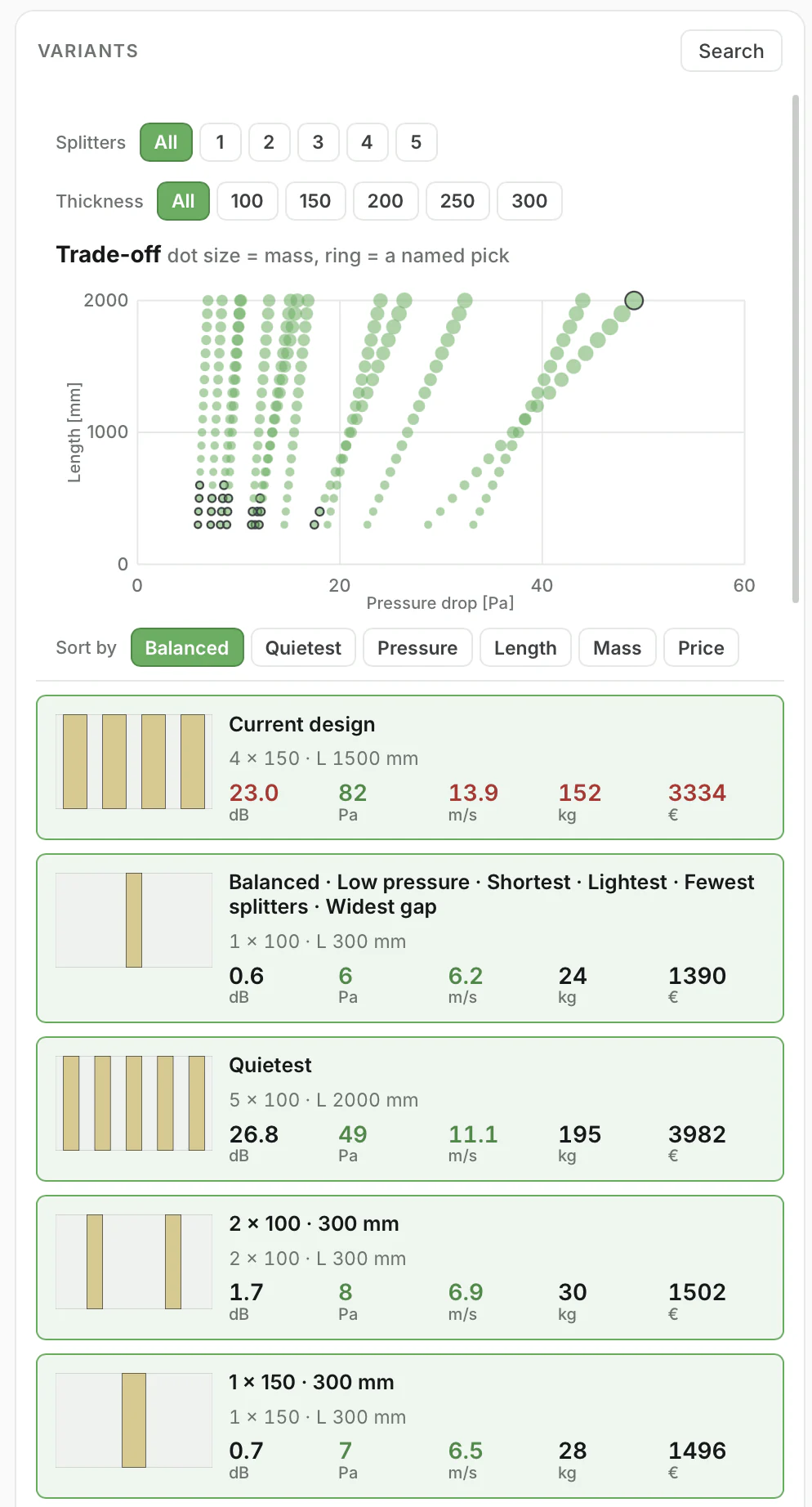
Every variant of the package on one chart
Length against pressure drop for every splitter count and thickness, with the dot size showing the weight. Named picks — balanced, quietest, lowest pressure, shortest, lightest, cheapest — are marked, so the customer sees immediately what a few extra decibels cost in length, pascals or euros.
- Filter by number of splitters and splitter thickness
- Sort by attenuation, pressure, length, mass or price
- Open any variant in the designer with one click
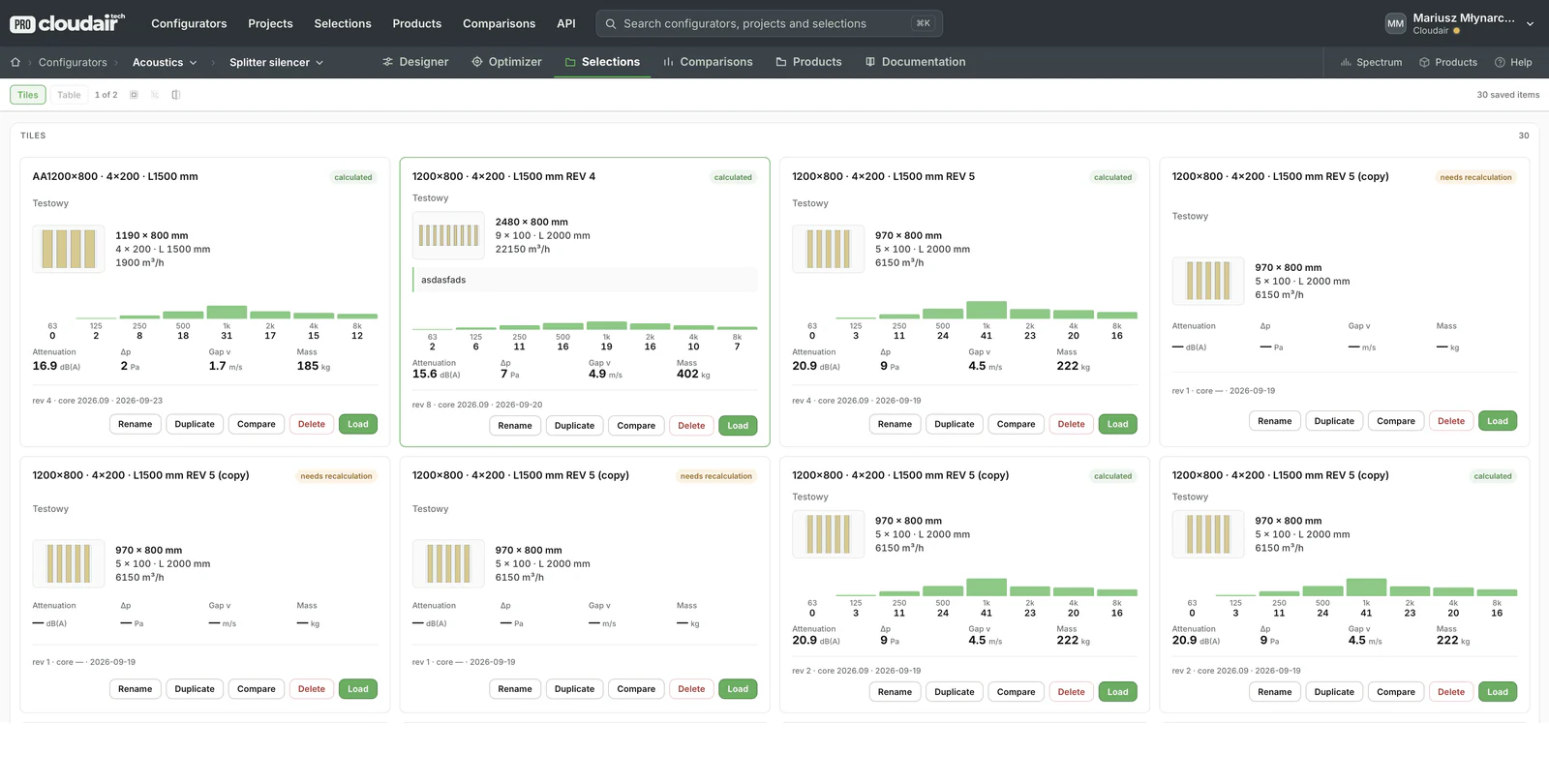
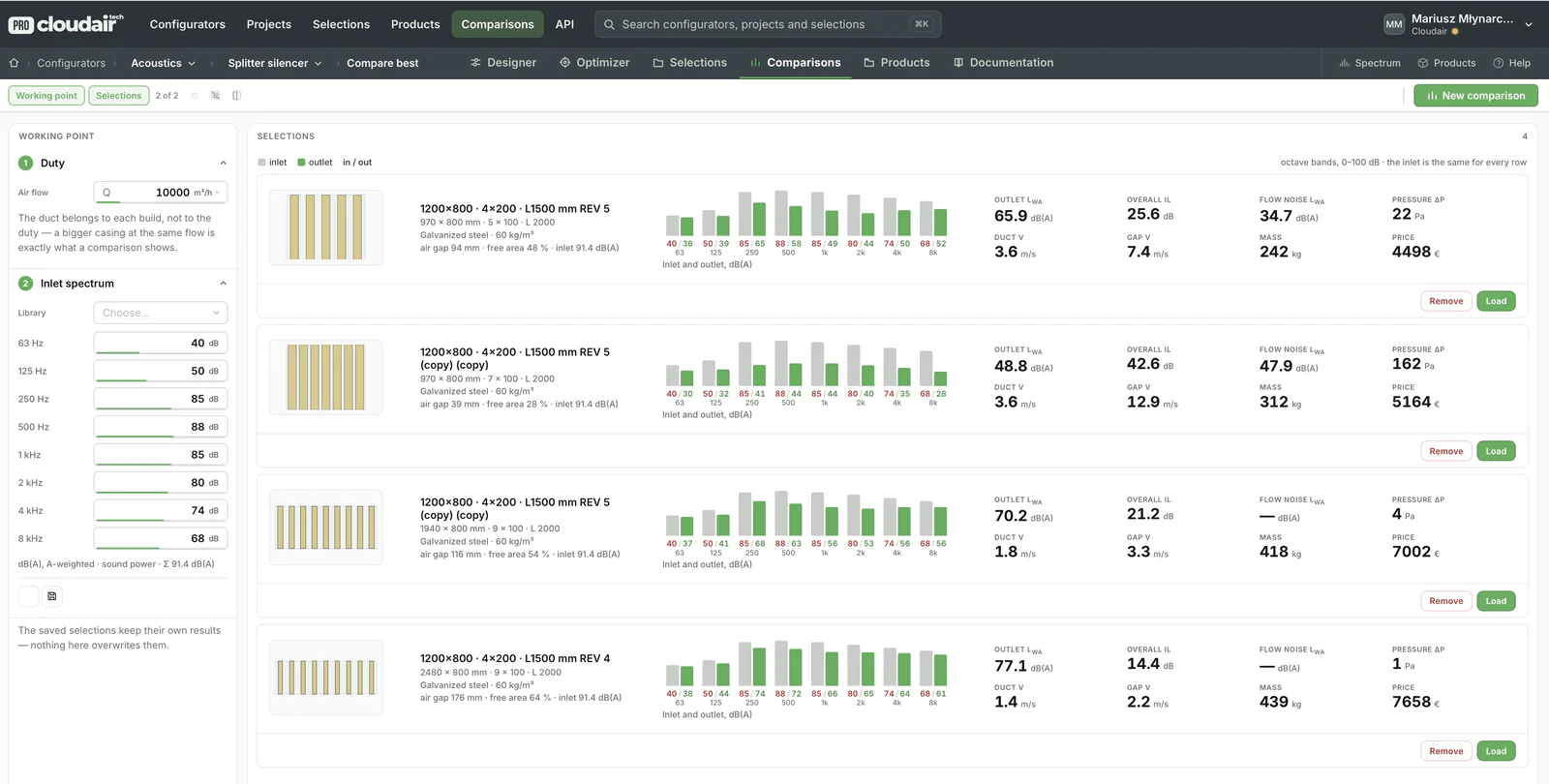
Projects, saved selections and comparisons
A silencer is rarely selected once. Designs are saved with their revisions, compared against one inlet spectrum, shared, exported and turned into products.
A branded datasheet for every selection
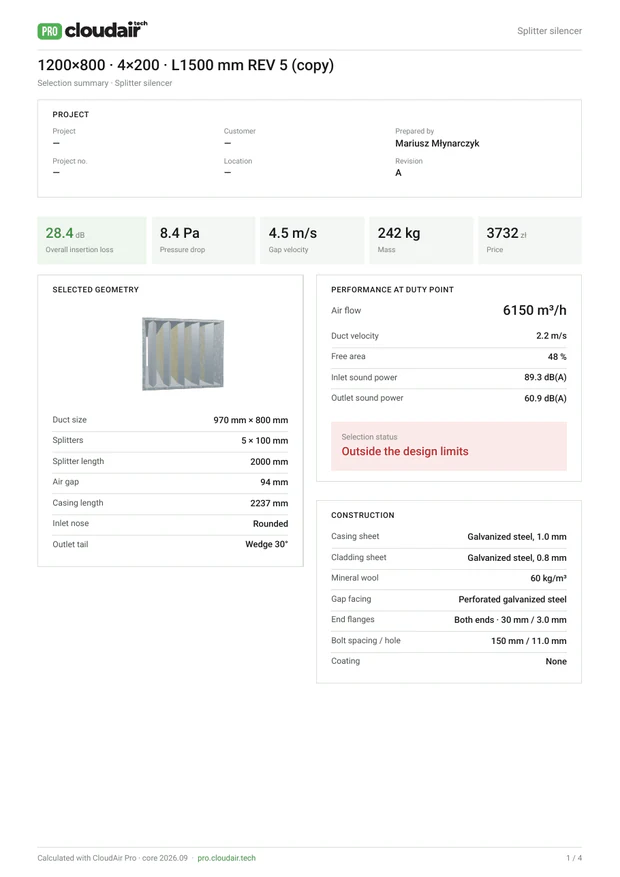
One click turns the selection into a four-page PDF under your logo — the summary with the key results, the acoustic performance band by band, the dimensioned drawing for the workshop and the bill of materials with the price. Design checks show pass or fail against the limits, and the last page carries an approval box.
Your silencers, your construction, your brand
We do not sell you a generic calculator. The program is configured to the way you build silencers and the way you sell them, and it runs on your domain under your name.
Already in production: the silencer selection software built for Frapol, a manufacturer of duct and rectangular silencers. The same platform runs fan selection software for manufacturers, and the product data can feed your PIM and generated catalogs.
We can build a silencer selection program for you
Tell us about your silencer range — types, sizes, materials and the data you already have. We will show you how it would look in your own program and what it takes to get there.
Common questions about silencer selection software
Which standard are the calculations based on?
Pressure loss and flow-generated noise of splitter silencers follow VDI 2081 Part 1 (section 7.2.3.2, equations 42, 44 and 49), checked against the worked example in VDI 2081 Part 2. Insertion loss is calculated per octave band from 63 Hz to 8 kHz and combined with the inlet sound power to give the outlet level in dB and dB(A).
Can the program use our own laboratory measurements?
Yes. If you have measured insertion loss or pressure loss for your splitter types, those values are used in place of the calculated ones for your product range. The standard method then fills the gaps for geometries you have not measured.
Is it limited to rectangular splitter silencers?
Rectangular splitter silencers are where the program starts, because they are the most configurable. Circular silencers, bends with splitters, cross-talk silencers and other products in your range can be added to the same program and the same datasheet.
Do you also build attenuator or sound attenuator selection software?
Yes. Silencers, attenuators and sound attenuators are the same family of products under different names, and the program is built for your range whatever you call it: rectangular splitter attenuators, circular duct attenuators, crosstalk attenuators or other acoustic HVAC products. Product names and terminology in the program follow yours.
Where do the weights and prices come from?
From the geometry of the selected design and your own price list: casing and cladding sheet area, mineral wool volume, flange steel, bolts and rivets, workshop hours, consumables and packing, plus your overhead, margin and sheet-waste percentages. Each manufacturer sees its own numbers, and you decide whether customers see the price.
Which CAD formats can be exported?
The 3D model exports as PNG, DXF, STL and OBJ, and the dimension drawings go into the PDF datasheet. Formats specific to your engineering workflow can be added.
Can it run on our website under our brand?
That is the point. The program runs on your domain, with your logo, colours, terminology and datasheet design. Through the Selection API it can also be called from your ERP, quotation system or a distributor portal.

Your silencer range, selectable online.
Calculated to VDI 2081, drawn in 3D, priced from your own list and delivered under your brand. Twenty minutes is enough to see how your range would look in it.