
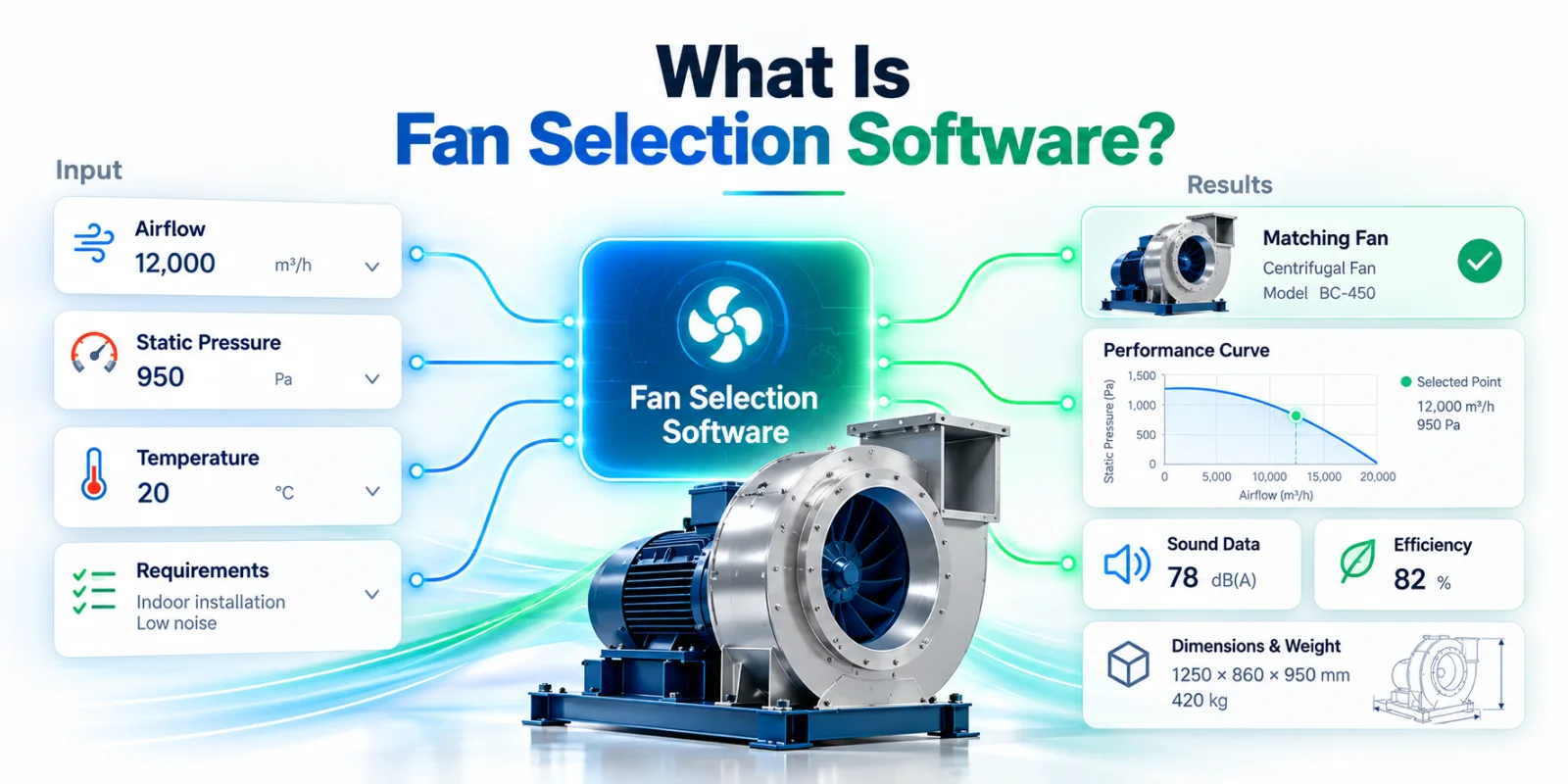
Fan selection software is an engineering application that finds the fans able to meet a required operating point. The user enters the airflow and pressure the system needs, and the software checks them against the manufacturer's measured performance curves and returns the models that can actually deliver that duty, with their speed, power, efficiency and sound data.
Instead of comparing catalog curves, motor tables, efficiency figures, sound levels and dimensions by hand, the engineer gets a ranked list of suitable fans in seconds.
Modern fan selection software does much more than identify a fan. It calculates where each fan will really operate, checks energy efficiency and regulatory compliance, compares products side by side, evaluates acoustics, generates technical datasheets and saves the whole selection inside a customer project. For a fan manufacturer, it becomes the digital extension of both the product catalog and the sales engineering team.
This article explains how it works, using a live example: the selection platform CloudAir built for CFB, an industrial fan manufacturer. Every screenshot below comes from cfb.cloudair.tech.
How does fan selection software work?
The principle is simple. The user describes what the system needs, typically:
- airflow,
- static or total pressure,
- air density, or the temperature and altitude it follows from,
- fan type or product family,
- how the fan will be controlled (fixed speed, inverter, manual),
- limits such as maximum sound level, minimum efficiency or maximum motor load.
The software then evaluates every fan in the manufacturer's database against those requirements. It does not look at catalog headline values such as "maximum airflow". It works with the fan's performance curves (pressure, power and efficiency as functions of airflow, often at several speeds) and determines whether the required duty point lies within each fan's operating range, and where exactly the fan will run.
The matching fans are then ranked by criteria such as efficiency, absorbed power, sound or proximity to the requested point.
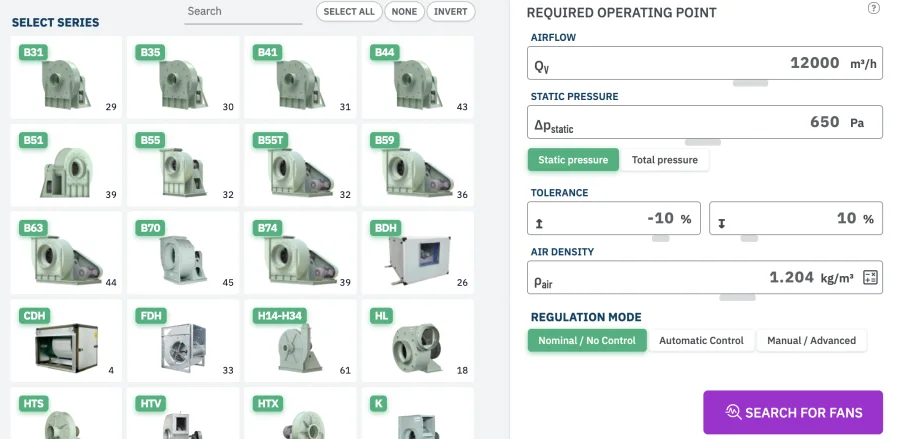
A practical example: the CFB selection platform
CFB Fan and Blower Corp. is a Taiwanese manufacturer of industrial centrifugal fans and blowers for HVAC, ventilation and process applications. Its catalog runs to dozens of series, each with many sizes and motor and drive variants. That is far too many to check manually for every enquiry.
CloudAir built CFB a dedicated, cloud-based selection platform on top of the manufacturer's own product data and measured curves. It is a selection engine that calculates, not a generic product configurator with filters (see the CFB case study for the full scope).
Take a common request: 12,000 m³/h at 650 Pa static pressure. With the fan running without speed control, the program searches every selected series and returns about twenty models from eight series that can meet the duty within the tolerance band.
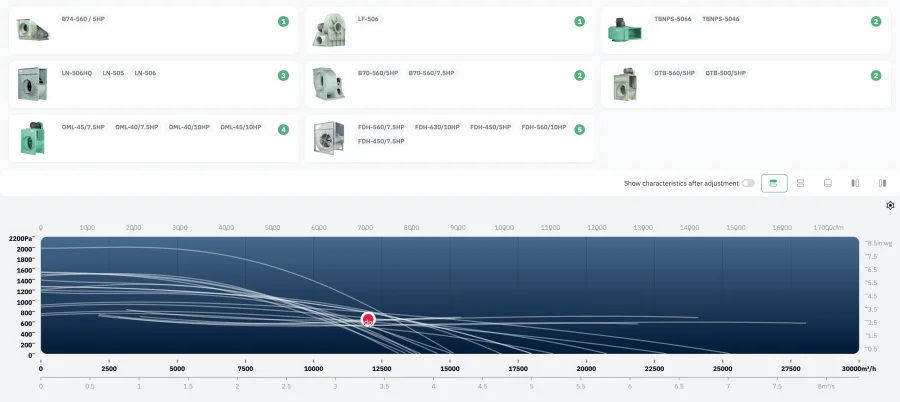
The result is more than a list of product names. For every matching fan the program calculates the actual operating data:
- airflow and static and total pressure at the operating point,
- fan speed and supply frequency,
- absorbed power, shaft power and motor load,
- static, total, motor and impeller efficiency,
- sound power level,
- specific fan power (SFP),
- Fan Energy Index (FEI) and ErP compliance.
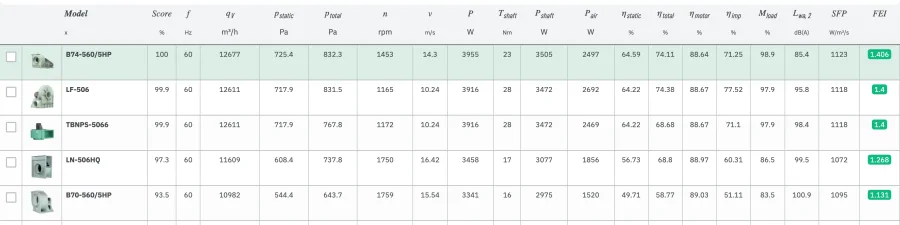
In this example the best-scoring fan is the B74-560/5HP: 12,677 m³/h at 725 Pa, 1,453 rpm, 3.96 kW absorbed power, 64.6% static efficiency and an FEI of 1.41. The engineer can use the result straight away, without another manual calculation step.
Fan performance curves and the operating point
A fan does not produce one fixed airflow and pressure. Where it operates depends on where its curve meets the resistance curve of the system. This is why professional selection software uses complete performance curves rather than nominal catalog values.
The example shows why. We asked for 12,000 m³/h at 650 Pa. Running at full speed without control, the B74-560/5HP settles where its curve crosses the system curve drawn through the requested point, at 12,677 m³/h and 725 Pa. The software shows both the requested and the calculated point, so the engineer can see the margin before deciding whether speed control is needed.
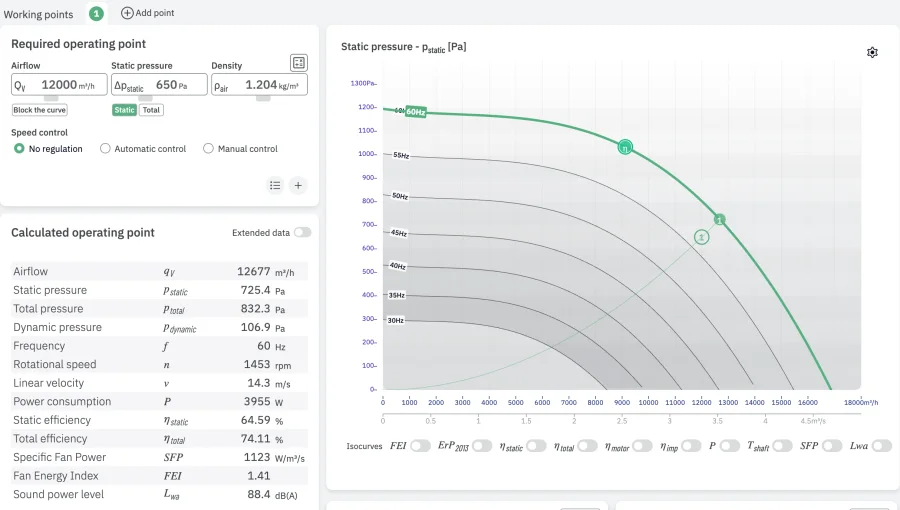
Next to the pressure chart, the program plots absorbed power, static and total efficiency and FEI, each with the operating point marked. Typical curves in a good selection tool include:
- static and total pressure,
- absorbed power,
- efficiency,
- speed or frequency,
- FEI,
- sound power.
For the background, see static vs total pressure and why a fan may not deliver the expected airflow.
Why is this better than a PDF fan catalog?
A PDF catalog is fine for documentation, but slow for selection. An engineer may have to look through dozens or hundreds of curves before finding a suitable unit, and then still calculate power, efficiency and noise at the actual point by hand.
A catalog helps answer the question:
Which fan can deliver 12,000 m³/h at 650 Pa?
Selection software answers that in a few seconds, and then answers the question that matters:
Which available fan delivers 12,000 m³/h at 650 Pa with the best efficiency and an acceptable sound level?
That is the fundamental difference between a digital catalog and a real selection system.
Fan Energy Index and ErP compliance
Energy efficiency is now a core part of fan selection, so modern software checks compliance during the selection, not after it.
In the CFB platform, the Fan Energy Index (FEI) is calculated live for every candidate and shown next to airflow, pressure, efficiency and sound power. ErP status is checked at the same time, and both can be drawn directly on the performance chart as isocurves.
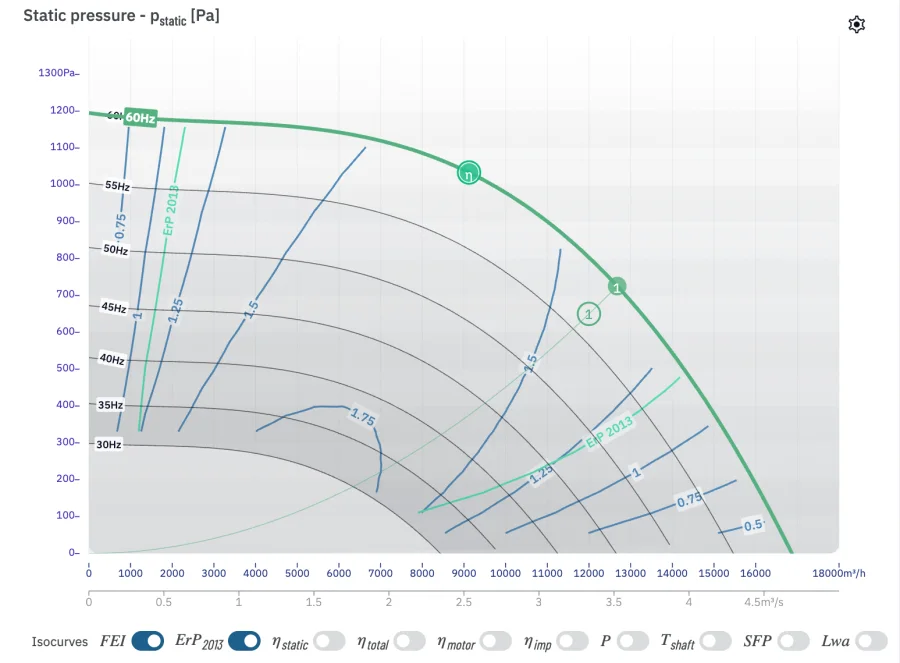
This matters in the example above. The top candidates reach an FEI of around 1.4, while some models further down the same list fall below 1.0 at this duty. Every one of them meets the airflow and pressure, but they are not equally good selections. Because the program puts FEI next to the other results, the engineer does not have to select a fan first and check compliance separately afterwards.
The CloudAir platform includes FEI and ErP 2026 checks as standard modules. For the regulation itself, see ErP 2026 for fans: what you need to know.
Acoustics
Sound is often the deciding parameter. Professional selection software stores or calculates acoustic data in octave bands, usually from 63 Hz to 8 kHz, so the user sees not only the overall level but also how the noise is distributed across frequencies.
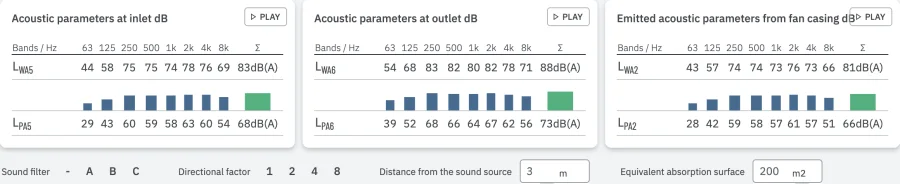
The program separates inlet, outlet and casing-radiated sound where the manufacturer's data allows it. That level of detail matters in:
- offices,
- hospitals,
- residential buildings and hotels,
- schools and studios,
- noise-sensitive industrial applications.
More on the theory: sound power vs sound pressure and octave bands.
Comparing several fans
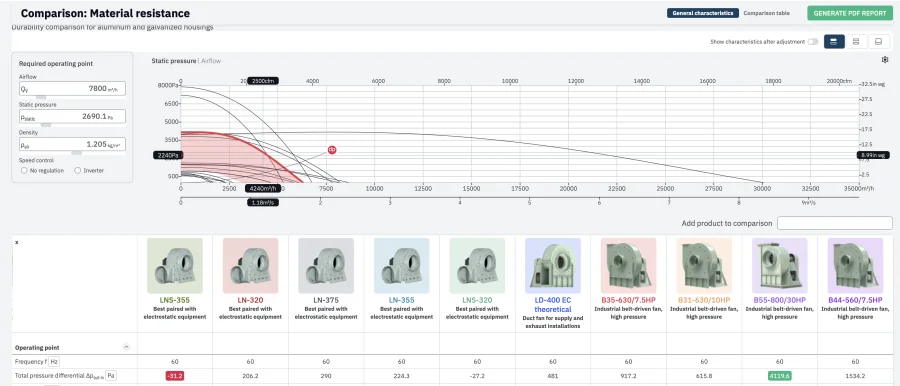
There is usually more than one technically correct fan for a duty point. In the 12,000 m³/h example, the B74-560/5HP and the LF-506 both deliver the duty at almost the same absorbed power (3.96 vs 3.92 kW). Yet the LF-506 is listed at a sound power about 10 dB higher. The two are equal on the duty point and very different in a noise-sensitive building.
Fans that meet the same point can still differ significantly in:
- efficiency and absorbed power,
- sound,
- dimensions and weight,
- motor size and drive type,
- purchase price,
- operating cost.
A selection program lets the user place the candidates side by side and compare them at the same operating point, so the choice is the best overall solution rather than simply the first fan that meets the duty.
Multiple operating points
Many systems do not run at one fixed condition. Airflow changes with occupancy, process load, season or control mode, and a fan that looks efficient at the design point may perform poorly for most of the year.
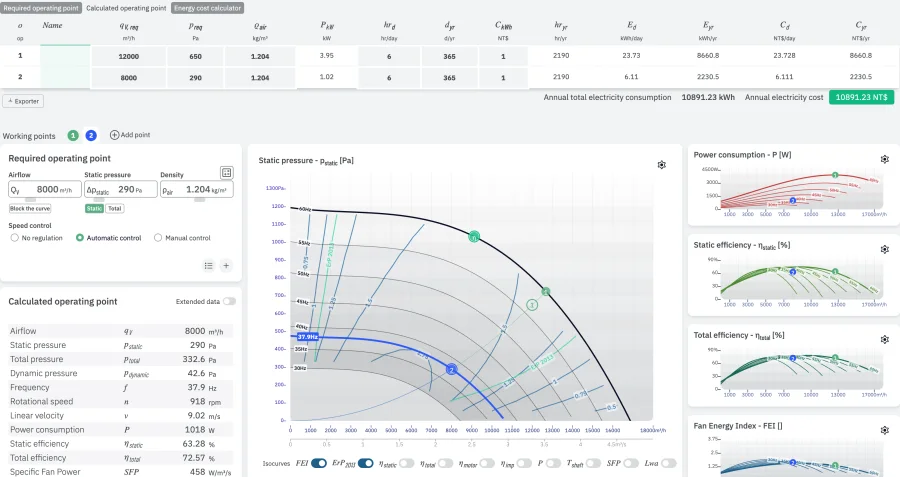
Advanced selection software therefore evaluates several duty points for the same fan. In the CFB program, a second working point can be added to the selected fan. In the example below, point 2 represents part load on the same system: 8,000 m³/h at 290 Pa with automatic speed control. The program calculates that the fan would run at 37.9 Hz and 918 rpm, absorbing about 1.0 kW instead of 3.96 kW, and it adds both points to the annual energy cost table.
This is useful for:
- variable air volume systems,
- industrial process ventilation,
- smoke control with separate normal and emergency duties,
- variable-speed applications,
- seasonal operating conditions.
Product configuration and accessories
The fan itself is often only part of the final product. After choosing a model, the user may also need:
- a motor and frequency converter,
- guards and flexible connectors,
- dampers and silencers,
- mounting frames and vibration isolators.
Selection software can take over this step as well. Accessories are assigned to the fan models they actually fit and offered only for those models, so the result is a valid, complete configuration rather than a fan plus a generic accessory list. The difference between the two approaches is covered in HVAC product configurator vs selection software.
Automatic PDF datasheets
Once the selection is complete, the software can generate a technical selection sheet automatically. In the CFB program it is one button on the product view, "Generate a selection card". A typical datasheet includes:
- product name and project information,
- the operating point and technical parameters,
- performance curves,
- sound data,
- dimensions and motor information,
- efficiency, FEI and ErP compliance.
The document uses the manufacturer's own logo, colours and layout. Sales engineers no longer have to assemble technical documentation by hand, and every card is stored so it can be edited, duplicated or exported again later. Branded PDF datasheets are a standard part of CloudAir's fan selection software.
Project management
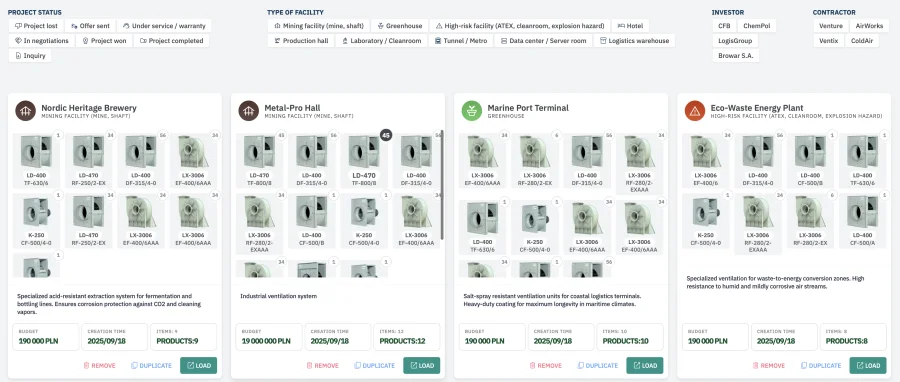
Selection software also works as a project tool. Instead of making individual selections and losing them, the customer creates a project and saves several fans inside it, for example:
- Project: Office Building A
- AHU-01: supply fan
- AHU-02: extract fan
- Garage: jet fan
- Roof: smoke extract fan
The project can be reopened, changed and exported at any time, and the documentation for all of its fans can be generated together.
The manufacturer's administration panel
For the manufacturer, one of the most important parts of a selection system is the one customers never see: the administration platform. The manufacturer's own team should be able to manage, without calling a developer every time something changes:
- products and series,
- performance curves,
- motor and acoustic data,
- dimensions,
- documents and images,
- translations,
- accessories,
- users.
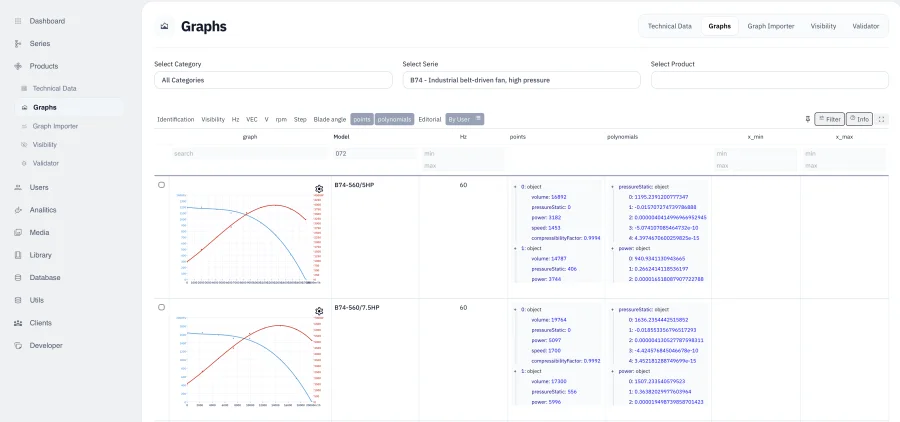
CloudAir's platform includes a complete administration system for product and technical data, with both bulk and point-by-point curve editing. See the platform overview and how to build a fan product database.
Cloud-based vs desktop fan selection software
Many fan selection programs used to be distributed as desktop applications. Web-based systems have clear advantages:
- the customer installs nothing,
- updates are available to everyone immediately,
- the manufacturer maintains one central database,
- every user sees the current product range,
- new standards and calculation methods go live without shipping a new installer.
The CFB system is an example of this cloud-based approach. Desktop or DLL-based engines are still useful when the selection must run inside another engineering program, such as an air handling unit configurator. For direct customer access, a browser-based platform is usually much easier to maintain.
What is the difference between fan selection software and a product configurator?
A product configurator usually filters products by predefined attributes, for example:
- size = 500 mm,
- motor = EC,
- voltage = 400 V.
Fan selection software goes further. It performs engineering calculations on the fan's actual performance characteristics and answers a different question:
Can this fan actually deliver the required airflow and pressure, and how will it perform at that point?
That is why fan selection software is closer to an engineering calculation system than to an e-commerce filter.
Who uses fan selection software?
Typical users include:
- HVAC engineers and mechanical designers,
- consultants,
- contractors and installers,
- distributors,
- the manufacturer's sales engineers,
- OEM and air handling unit manufacturers,
- system integrators.
The same software therefore serves engineering and sales. The engineer gets the calculations; the salesperson gets a fast way to find the right product and produce the documentation.
Why do fan manufacturers provide selection software?
The biggest advantage for a manufacturer is less manual work when selling a technically complex product. Without selection software, customers send requests such as:
Please select a fan for 18,000 m³/h and 750 Pa.
An engineer or salesperson then performs the selection manually, often for the same kind of request many times a week. With online software, the customer makes the first selection on their own, and the manufacturer's team can focus on unusual projects and high-value engineering work.
A good selection platform also makes the manufacturer's products easier to specify at the design stage. That directly affects whether the product ends up in the project.
What should good fan selection software include?
At minimum, a modern system should provide:
- duty-point selection,
- full performance curves,
- product filtering,
- operating point calculation,
- technical product data,
- acoustic information,
- efficiency calculations,
- product comparison,
- PDF datasheets,
- project management,
- administration tools.
More advanced platforms add:
- FEI calculations and ErP compliance,
- energy cost calculations,
- multiple operating points,
- accessories,
- 3D models,
- multilingual interfaces,
- metric and imperial units,
- API integration,
- ERP or PIM integration.
CloudAir structures its platform as more than 45 individual modules, so each manufacturer's system is built around its own catalog rather than a fixed template.
Fan selection software as part of digital transformation
Fan selection software is no longer just a calculator. For a modern fan manufacturer it can become the central digital product platform that connects:
technical product data → engineering calculations → selection → documentation → projects → sales
Customers find and specify products much faster, and the manufacturer keeps full control of its product information. The CFB platform is a practical example: catalog, engineering selection, compliance calculations, comparisons, projects and administration in one browser-based system.
Conclusion
Fan selection software is an engineering tool that automatically selects suitable fans from the required airflow, pressure and other operating conditions.
The best systems go much further. They combine fan performance calculations with acoustics, energy efficiency, regulatory compliance, product configuration, technical documentation and project management. For manufacturers, this turns a traditional catalog into an interactive engineering and sales platform. For engineers, it turns a slow manual selection into a fast, repeatable workflow.
You can try the live example at cfb.cloudair.tech, read how it was built in the CFB case study, or see what the underlying platform offers on the CloudAir fan selection software page.
Frequently asked questions
What is fan selection software?
An engineering application that selects suitable fans for a required operating point. It compares the required airflow and pressure with each fan's performance curves and calculates the actual operating data, such as speed, power, efficiency, FEI and sound, for every fan that can meet the duty.
What inputs does fan selection software need?
At minimum, airflow and static or total pressure. Most programs also take air density (or temperature and altitude), an acceptable tolerance, the control method, and optional limits such as maximum sound level, minimum efficiency or minimum FEI.
Why does the selected fan deliver more than the requested airflow?
Without speed control, a fan runs where its own curve crosses the system curve, which is rarely exactly the requested point. In the example above, a request for 12,000 m³/h at 650 Pa gives 12,677 m³/h at 725 Pa at full speed. Speed control or a different size brings the fan onto the requested point.
Does fan selection software check ErP and FEI compliance?
Modern programs do. FEI and ErP status are calculated for each candidate at its operating point during the selection, and can be drawn on the performance chart, so compliance is not a separate step.
Is fan selection software the same as a product configurator?
No. A configurator assembles a valid combination of options; selection software calculates which fans can meet an engineering requirement. Many manufacturers need both, connected in one workflow.