
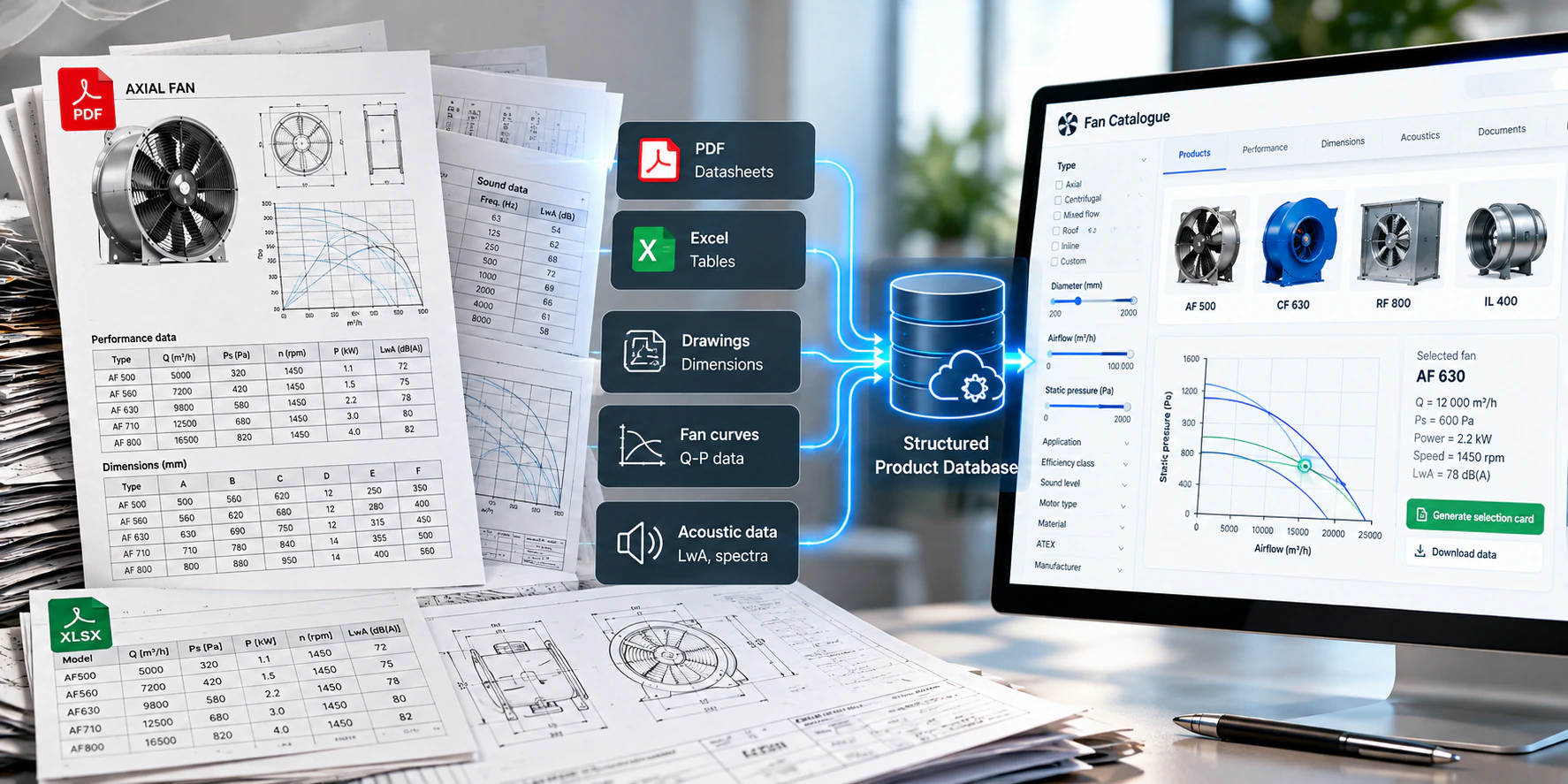
For many fan manufacturers, the product catalogue still lives in a mix of PDF files, Excel sheets, technical drawings, laboratory reports and performance charts. That works for documentation, but it is a poor foundation for digital tools.
Digitizing a fan catalogue does not mean reproducing the PDF in another format. It means turning it into a structured engineering database that can feed online catalogues, fan selection software, product configurators, PIM systems, APIs, ERP integrations, BIM tools, automatic documentation and customer portals.
The most important principle is simple:
Do not store every value that can be calculated. Store the reliable source engineering data, and calculate derived values when they are needed.
That keeps the database smaller, more consistent and much easier to maintain.
What does it mean to digitize a fan catalogue?
It means converting static product information into structured data that software can understand. A PDF catalogue contains product names, airflow ranges, pressure curves, dimensions, motors, materials, sound data, accessories, drawings and certificates. A person can read all of it; software needs the same information stored in a defined structure.
Instead of storing "Maximum airflow: 12,000 m³/h" as text, the database stores a numerical parameter with a unit. The value becomes searchable, comparable and usable in calculations, and the same data can then be reused across every system without separate copies.
1. Start with a product data audit
The first step is to find out where the product information currently exists. Typical sources are:
- PDF catalogues and technical datasheets,
- Excel files and CSV exports,
- ERP systems and SQL databases,
- CAD drawings (DWG, DXF) and SVG drawings,
- laboratory test reports and acoustic reports,
- motor databases,
- old scanned documentation.
In many companies the same parameter lives in several places, and the copies disagree. For example:
| Source | Maximum airflow |
|---|---|
| PDF catalogue | 12,500 m³/h |
| Excel | 12,700 m³/h |
| ERP | 12,000 m³/h |
Before importing anything, decide which source is authoritative for each kind of data. Digitization should begin with a data audit, not with programming.
2. Create a clear product hierarchy
Next, define how products are organized. A typical structure is category → series → size → variant, for example centrifugal fans → CA → CA-500 → CA-500 at 1450 rpm with a given motor. Some ranges also need levels or options for the impeller, rotation direction, casing version or material.
The hierarchy should follow the real logic of the product range, because not every parameter belongs to the same level:
A poorly designed hierarchy causes problems later in selection software, configurators and APIs, because the same value ends up stored in several places or attached to the wrong product.
3. Keep technical and nominal data flexible
A common mistake is one fixed list of technical parameters for every fan. Different series need different data. A centrifugal series may need impeller diameter, inlet diameter, outlet width and height, motor position, casing material, maximum temperature and rotation direction. An axial series may instead need nominal diameter, number of blades, blade angle, hub diameter, pitch and impeller material.
Technical and nominal data should therefore be configurable per product series. For each variable, the manufacturer should be able to set:
- name, data type, unit and default value,
- whether it is required,
- whether it appears in search, in the catalogue, in selection results and in PDF documentation,
- whether it is used in calculations.
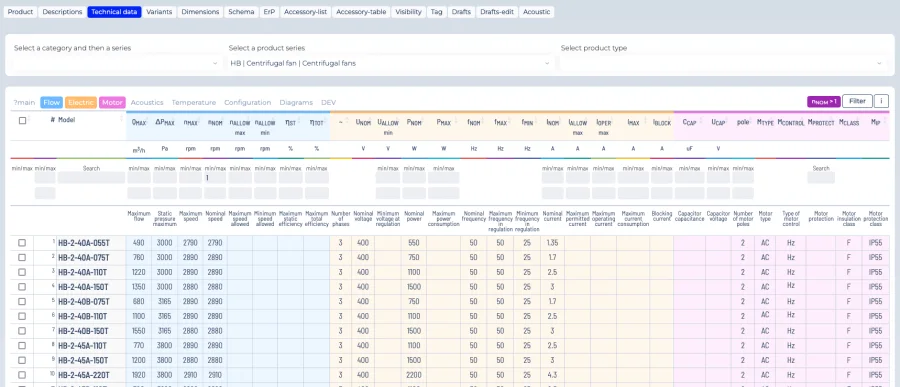
This is what lets very different fan technologies live in one system. More on designing the data model: how to build a fan product database.
4. Store engineering values in SI units
Separate database units from display units. The database stores every technical value in one consistent SI-based system; the interface converts it into whatever the user prefers.
| Quantity | Stored as | Shown as, for example |
|---|---|---|
| Airflow | m³/s | m³/h, l/s, CFM |
| Pressure | Pa | kPa, mmWG, inWG |
| Power | W | kW, hp |
| Dimensions | one agreed length unit | mm, inches |
| Temperature | °C or K, as the calculation model needs | °C, °F |
| Speed | rpm | rpm |
Conversion happens in the application, so one set of engineering data serves users in Europe, the United States and Asia without separate databases per market.
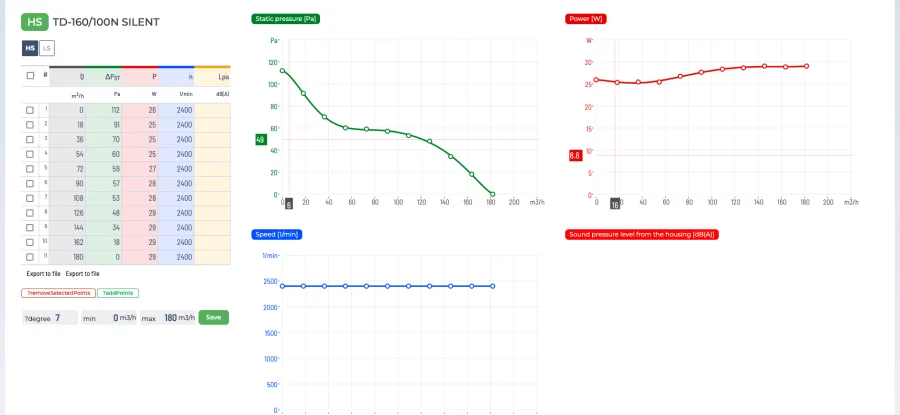
5. Digitize the fan performance curves
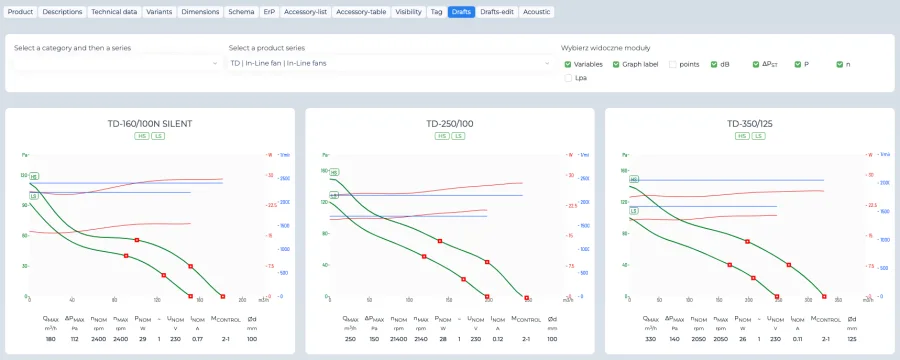
Performance curves are the most important engineering part of the catalogue, and the database does not need to store every calculated parameter. A performance point needs only:
- Q: airflow,
- Ps and/or Pt: static and/or total pressure,
- P: absorbed power,
- n: rotational speed.
Efficiency, specific fan power, interpolated operating points, performance at other speeds and at other air densities can all be calculated from these values. If efficiency follows from airflow, pressure and power, there is no reason to keep a separate efficiency value at every point, unless the manufacturer specifically wants to publish measured values.
A curve stored as numerical points might look like this:
| Q | Ps | Pt | P | n |
|---|---|---|---|---|
| 1.5 m³/s | 920 Pa | 980 Pa | 2,100 W | 1,450 rpm |
| 2.0 m³/s | 760 Pa | 830 Pa | 2,500 W | 1,450 rpm |
| 2.5 m³/s | 520 Pa | 600 Pa | 2,900 W | 1,450 rpm |
| 3.0 m³/s | 260 Pa | 350 Pa | 3,300 W | 1,450 rpm |
The user may see m³/h and kW, but internally the data stays in SI, and the selection engine interpolates between the measured points.
6. Static pressure, total pressure or both
Manufacturers test differently: some publish static pressure only, some total pressure only, some both. The database should accept all three cases. Where enough data exists, the missing component can sometimes be calculated, but the database should always preserve the actual source data rather than force every range into one format. The difference between the two is explained in static vs total pressure.
7. Add acoustic operating points
Acoustics can be tied directly to the aerodynamic data. For an operating point, the database can store octave-band sound data from 63 Hz to 8 kHz, separately for the inlet, the outlet and the casing. A complete acoustic point is therefore Q, pressure and speed plus three spectra, which is far more useful than one overall dB value.
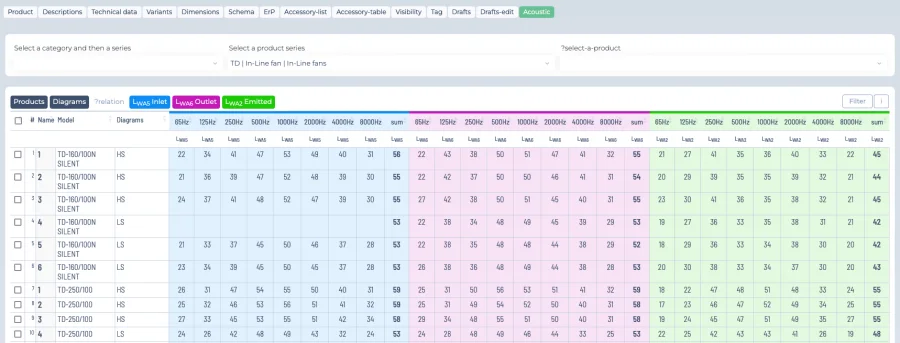
The system can then use them in selection results, comparisons, documentation, acoustic calculations and silencer selection. If acoustic test points do not match the aerodynamic points exactly, they can be kept as a separate dataset and interpolated. Background: sound power vs sound pressure and octave bands.
8. Use numerical test data whenever possible
The best source is always original numerical test data: airflow, pressure, power, speed and sound spectra. If it exists in Excel, CSV or a laboratory database, it can usually be imported directly, with the highest accuracy and the least interpretation.
Many older ranges no longer have numerical curve data, though. Sometimes the only source is a printed or scanned catalogue. This is where AI-assisted digitization helps.
9. AI-assisted curve digitization
AI can significantly speed up the digitization of old catalogues. It can analyze scanned PDFs, curve images, tables and legacy documentation, and identify chart axes, scales, units, individual curves, speed labels and duty points. The image is then converted into numerical performance data.
A scanned curve that used to require manual point-by-point digitization can be processed in a fraction of the time. But extracted data must always be validated: AI is very good at data extraction, and the final engineering data should still be checked against the original source.
10. AI can analyze more than curves
The same approach works for whole catalogue pages. AI can detect product names, model codes, technical tables, dimensions, materials, motor data, operating limits, application descriptions, drawing references and document types, and map them to the target database structure. For manufacturers with decades of legacy documentation, that removes most of the manual retyping.
11. Organize motor data
Store motors as structured objects rather than text inside product descriptions: manufacturer, motor type, rated power, voltage, frequency, number of poles, speed, current, efficiency class, protection class, insulation class and mounting arrangement. Compatible motors can then be linked to fan products, and the system can check automatically whether a motor suits a specific operating point. See also how to choose the right motor for a fan.
12. Digitize dimensions and drawings
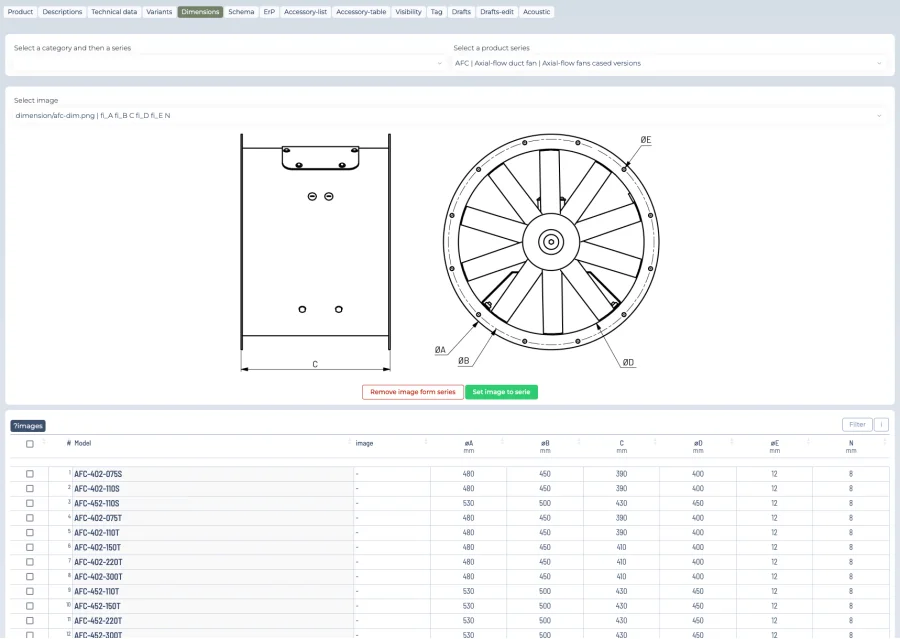
Dimensional data covers width, height, length, inlet diameter, outlet dimensions, mounting holes, flange dimensions and weight. Drawings may exist as PDF, DWG, DXF, SVG, STEP, raster images or scans. Existing vector drawings are relatively easy to integrate; scans and old PDF pages may need to be redrawn. For web applications, SVG is especially useful, because it scales without losing quality and can be generated or annotated dynamically.
13. Make technical drawings data-driven
Instead of storing hundreds of almost identical drawings, a series can often use one vector template whose dimensions (A, B, C, D, inlet diameter, outlet size) come from the database. The drawing is maintained once; the values are maintained per model.
14. Organize documents
Installation instructions, certificates, declarations, manuals, dimensional drawings, electrical diagrams, maintenance documents, BIM and CAD files should be linked directly to the category, series, product or variant they apply to. Once they are, the same document appears automatically in the online catalogue, the selection results, the customer portal, the generated PDF and the API response.
15. Define accessories and product relationships
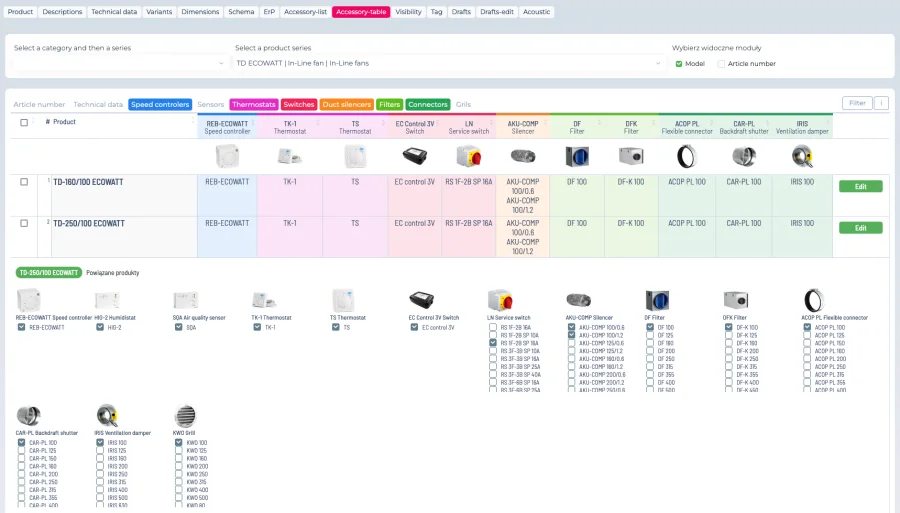
Fans rarely ship alone: flexible connectors, vibration isolators, inlet cones, outlet transitions, silencers, guards, dampers, motor covers, mounting frames and frequency converters all belong to the product. The database should understand these relationships, for example "accessory A fits fan sizes 400–630" or "frequency converter B suits motors from 2.2 to 7.5 kW". That turns the catalogue into the foundation of a configurator.
16. Give the manufacturer an administration panel
Once the data is structured, the manufacturer's own team should be able to manage it without a developer: create series and products, define custom variables, import curves, add acoustic points, upload drawings and documents, assign accessories, configure relationships, manage translations, define how units are presented and edit catalogue descriptions.
See the platform overview for the full admin side.
17. Add search and filtering
Structured data can be searched properly. Users can filter by fan type, airflow, pressure, diameter, power, motor type, temperature, material, application, installation type, efficiency and sound level, and the available filters can differ per series, which is another reason for series-specific variables.
18. From digital catalogue to fan selection software
A digital catalogue finds products by their attributes. Fan selection software goes further: it uses the performance data to decide which fans can actually meet a duty point. Instead of searching for "centrifugal fans with Qmax above 12,000 m³/h", it answers "which fans deliver 12,000 m³/h at 800 Pa?" That needs performance curves, operating point calculation, interpolation and engineering logic, so the digital catalogue becomes the foundation of the selection system. A live example is described in what is fan selection software.
19. Digital catalogue vs PIM
A conventional PIM focuses on marketing descriptions, images, categories, translations, documents and e-commerce attributes. A fan-specific PIM also manages performance curves, acoustic data, motor relationships, dimensions, engineering units and calculation data, which makes it far more useful for technical manufacturers. More in PIM for HVAC manufacturers.
20. Create one source of truth
The end goal is one central source of product information instead of separate versions in Excel, the PDF catalogue, the website, the selection software, the ERP, the PIM and the dealer portal.
A product update is then made once, in one place.
21. Validate the data
Validation is essential, especially when AI is used for extraction. The system should flag missing values, duplicate products, inconsistent units, incorrect curve points, missing motor relationships, unrealistic efficiencies, missing drawings, invalid accessories and incomplete acoustic spectra. Every automatic extraction should be followed by engineering verification.
22. A practical digitization workflow
Put together, a complete digitization project follows six steps:
Inside step 5, the order of work is usually: product hierarchy, basic technical data, performance curves, motor data, acoustic data, dimensions, technical drawings, accessories, documentation and translations.
23. Digitize one series completely first
It is usually better to digitize one series completely than the whole catalogue partially. Once the first series works end to end, from database to selection results to datasheet, the same structure can be reused for the rest of the range, and the problems found along the way are fixed once instead of hundreds of times.
24. Common mistakes
- Copying the PDF structure. A PDF is designed for people; a database must be designed for software.
- Storing calculated values. If a parameter can be reliably calculated, it usually should not be stored separately.
- Mixing units. Normalize internally and let the interface convert.
- One parameter structure for every series. Different products need different variables.
- Treating curves as images. A picture of a curve cannot be used by a selection algorithm; curves must become numbers.
25. Benefits of a digitized catalogue
- Faster product search by technical parameters.
- Better fan selection, with performance data feeding the calculation engine directly.
- Consistent information, because every system uses the same source.
- Automatic unit conversion for every market.
- Easier updates, made once.
- Better integrations through APIs.
- Automatic documentation, with PDF datasheets generated from the database.
- Easier international expansion, with translations and units managed centrally.
- AI readiness: structured engineering data can later feed assistants and recommendation tools.
Can AI digitize an old fan catalogue?
Yes. Modern AI can work with scanned catalogues, low-quality PDFs, tables, curve images, drawings and technical descriptions. For curves, it identifies the axes, the scale and each curve and converts them into numerical points; for product data, it classifies parameters and maps them into the target structure. It does not replace engineering verification, but it removes most of the manual work, which makes large legacy catalogues practical to digitize.
Conclusion
Digitizing a fan catalogue is not converting PDF pages into a website. It is turning static documentation into a structured engineering data model: a product hierarchy, series-specific variables, SI units inside, performance points built from Q, Ps/Pt, P and n, optional acoustic points, motor data, dimensions, drawings, documents, accessories, engineering validation and, where the sources are old, AI-assisted extraction.
Once that structure exists, the same database can power digital catalogues, fan selection software, product configurators, PIM systems, APIs, ERP integrations, BIM, customer portals and automatic documentation. The goal is not to reproduce the old catalogue, but to extract its reliable engineering information and build a platform that calculates and distributes everything else. To see how data preparation affects a project budget, read how much fan selection software costs.
Frequently asked questions
What data is needed for a fan performance point?
Airflow Q, static and/or total pressure, absorbed power P and speed n. Efficiency, specific fan power and performance at other speeds or densities can be calculated from these.
Should efficiency be stored in the database?
Usually not. If it can be calculated from airflow, pressure and power, storing it separately only creates a second value that can disagree with the first. The exception is when the manufacturer wants to publish separately measured efficiency values.
Can AI extract fan curves from scanned PDFs?
Yes. AI can detect the axes, scale, units and individual curves on a scanned chart and convert them into numerical points. The result must still be validated against the original by an engineer before it is used for selection.
In which units should fan data be stored?
In one consistent SI-based system, for example m³/s, Pa, W and rpm. The interface converts to m³/h, CFM, inWG, hp or any other unit the user prefers.
Where should we start?
With a data audit, then one complete series: hierarchy, technical data, curves, motors, acoustics, dimensions, drawings, accessories, documents and translations. Once it works end to end, the structure is reused for the rest of the range.