

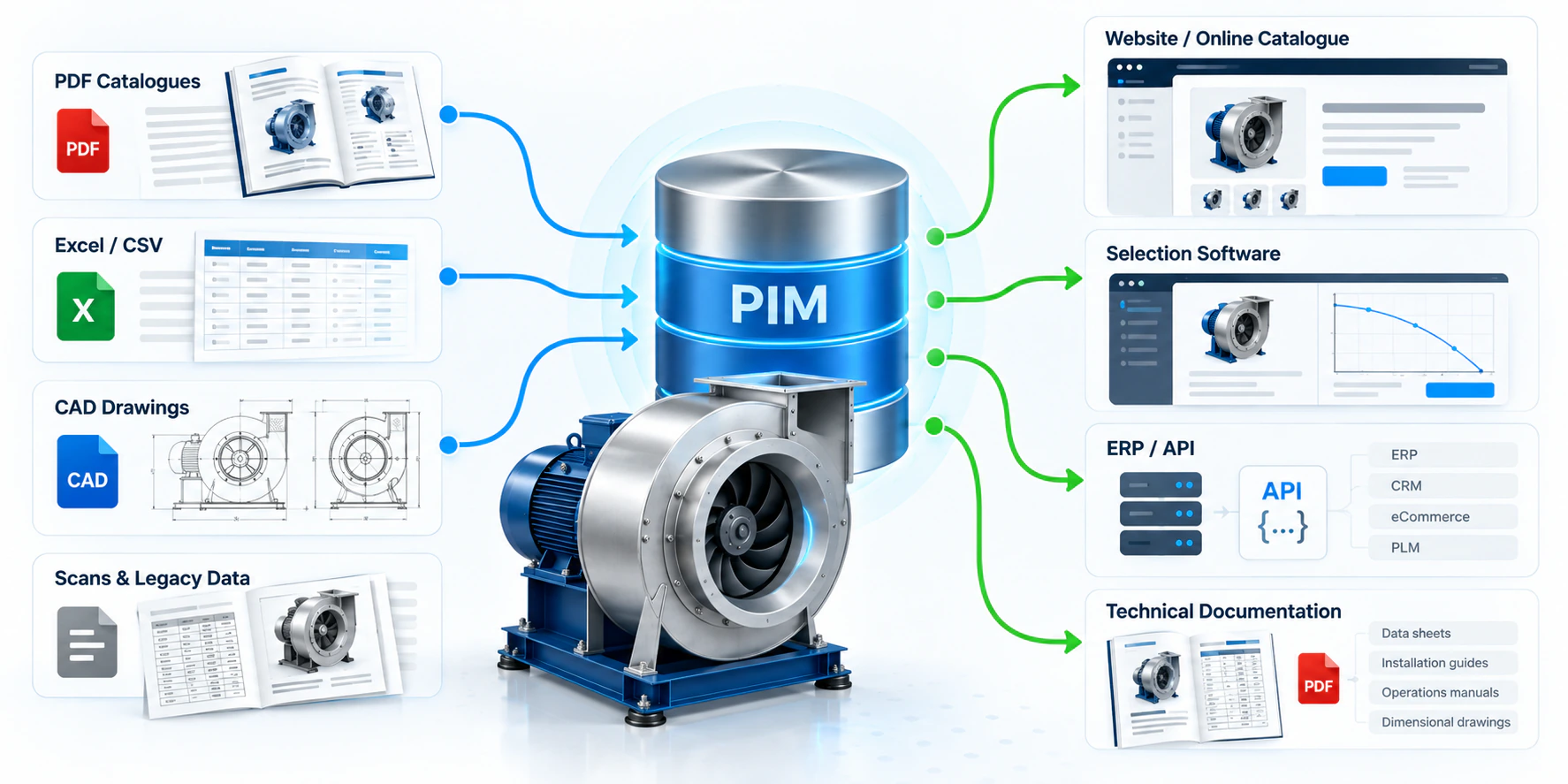
Most fan and HVAC manufacturers maintain the same product data at least four times: once in the PDF catalog, once on the website, once in the selection program, and once in the ERP or B2B portal. Each copy is updated by a different person, on a different schedule, from a different source file. The predictable result is that a customer selects a fan on one set of numbers, receives a datasheet with another, and your engineering team spends its week reconciling which one was actually right.
The fix is not more discipline. It's structural: one database holds the product data, and every channel is generated from it. That database is a PIM — Product Information Management — and for a technical manufacturer it has to do considerably more than store names, prices and photographs.
What is a PIM system?
A PIM system is a central repository for the descriptive and technical data that defines your products, plus the machinery to distribute that data to every channel that consumes it — website, online catalog, PDF datasheets, selection software, wholesaler feeds, ERP, B2B and partner APIs.
It is easy to confuse with systems you already run, so it helps to draw the boundaries:
| System | Owns | Typical content |
|---|---|---|
| ERP | Transactions | Stock, order lines, costs, production, invoicing |
| PIM | Product meaning | Specifications, performance data, classifications, descriptions, translations, relationships |
| DAM | Binary assets | Photography, dimensional drawings, CAD, certificates, BIM objects |
| CMS / web | Presentation | Page layout, editorial content, campaigns |
The ERP knows a fan costs €340 and that eleven are in stock. It has no opinion on the fan's pressure curve, its sound power at 250 Hz, or how the phrase "belt-driven, high pressure" should read in Turkish. That is the PIM's job — and in a manufacturer's business it is the data customers actually make buying decisions on.
In a mature setup the PIM holds the golden record: for any given fact about a product, exactly one field in one system is authoritative, and every other appearance of that fact anywhere in the business is a copy generated from it, never an independently maintained value.
Why HVAC product data is more complex
Generic PIM platforms were built for retail. Their data model assumes a product is a bag of scalar attributes: colour is "red", weight is 2.4 kg, material is "steel". Ventilation equipment breaks that assumption in several ways at once, and this is the single biggest reason off-the-shelf PIM projects stall in HVAC companies.
Performance is a function, not a number
A fan is not characterised by "airflow: 5,000 m³/h". It's characterised by a pressure–flow curve, a power curve and an efficiency curve — each an ordered set of points, each valid only at a stated rotational speed and a stated air density. The same wheel produces a whole family of curves across its speed range. A field that holds one number cannot represent this; you need curve storage with the reference conditions attached, and the ability to scale between speeds using the fan laws.
Acoustic data is an array per operating point
Sound power isn't a value, it's a spectrum: levels across the 63 Hz to 8 kHz octave bands, potentially split into inlet, outlet and casing breakout, and varying with the duty point on the curve. A single "noise: 72 dB(A)" attribute throws away almost everything an acoustic consultant needs — see how the full spectrum is actually used in our VDI 3731 fan acoustics calculator.
Much of the data is derived, not stored
Fan Energy Index, specific fan power and ErP compliance status are not attributes anyone should be typing into a field. They are computed from the curve, at a specific duty point, under a specific reference density and regulatory method. If you store them as static values, they silently go stale the moment a curve is re-measured or a regulation threshold changes. Store the inputs; compute the rest on demand — the way our FEI calculator and ErP 2026 compliance calculator work.
Numbers are meaningless without their reference conditions
Every performance figure carries invisible context: the air density it was measured at, the installation category it was tested in (AMCA 210 / ISO 5801 Type A to D), and whether the pressure is static or total. Two fans whose catalog figures look 15% apart may be identical machines described under different conventions. A PIM that stores the number but drops the context produces data that cannot be safely compared or exported — we covered exactly this failure mode in AMCA 210 vs ISO 5801 and static pressure vs total pressure. Density in particular has to travel with the data; the air density calculator shows how far figures shift with temperature and altitude.
Variant explosion
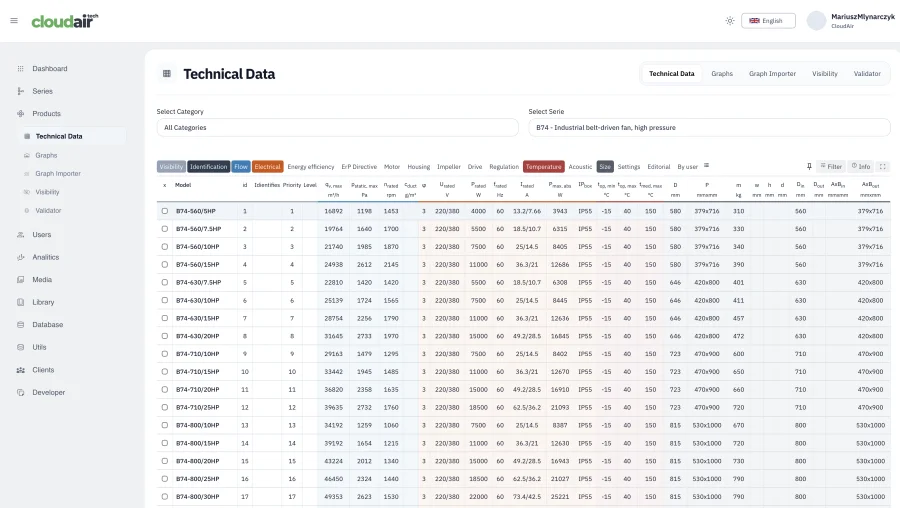
A few hundred base models multiply into thousands of orderable configurations: size × motor pole count × voltage and frequency × drive arrangement (direct or belt) × impeller material × accessories. Expressed as a flat SKU list this becomes unmanageable and unmaintainable. It has to be expressed parametrically — a structure of series, sizes and options with compatibility rules stating which guard, damper, silencer or drive kit fits which size.
The problem with data stored in Excel, PDFs and separate databases
Almost every manufacturer starts here, and for a single product line it genuinely works. It stops working at the point where the same fact exists in more than one place and no rule says which one wins.
The typical symptoms are recognisable:
- The website shows a size that was discontinued two quarters ago, because the discontinuation was recorded in the ERP and the price list but never in the CMS.
- The selection program returns a fan whose published curve no longer matches the catalog, because the curve was re-measured and only the catalog was reissued.
- Two datasheets for the same model circulate with different revision dates and different sound data, and nobody can say which is current.
- Translations drift: the German description mentions a feature that was removed from the English one a year ago.
- A wholesaler rejects your product feed because five attributes are missing — and nobody knows where those attributes were supposed to come from.
The cost is usually accounted for as administrative overhead, which understates it. The real exposure is commercial and technical: a customer who selects equipment on stale performance data and installs it has a legitimate claim when it underperforms. Worse, nobody in the organisation can reconstruct when the value changed or who changed it, because spreadsheets and shared drives keep no meaningful audit trail. Change history and rollback are not luxury PIM features for a manufacturer — they are the mechanism by which you can answer that question at all.
Connecting PIM with fan selection software
Selection software is the most demanding consumer of product data you will ever connect, because it does not merely display the data — it computes on it. That distinction drives the whole integration design.
To run a selection, the engine needs, per model: curve data as ordered point sets (or fitted polynomial coefficients) with the speed and density they are valid at; the permitted speed range; motor and drive data; and the operating limits — maximum temperature, maximum speed, power limits, permitted installation types. If the PIM holds all of that in a structured form, the selection program needs no database of its own. It reads the same records the catalog and the datasheets read.
The practical payoff is immediate and slightly boring, which is the point: mark a size as discontinued in the PIM, and it stops appearing in selection results that same moment — not at the next catalog reissue. Re-measure a curve, and the next selection uses it, the generated datasheet uses it, and the API returns it, without a single manual copy step. Verify any individual result yourself against the fan operating point calculator.
This is why we treat the two as one platform rather than two products: CloudAir's PIM and its fan selection software run on the same database, so a selection result cannot be computed from data that differs from what your catalog publishes.
Automatic datasheets and multilingual catalogs
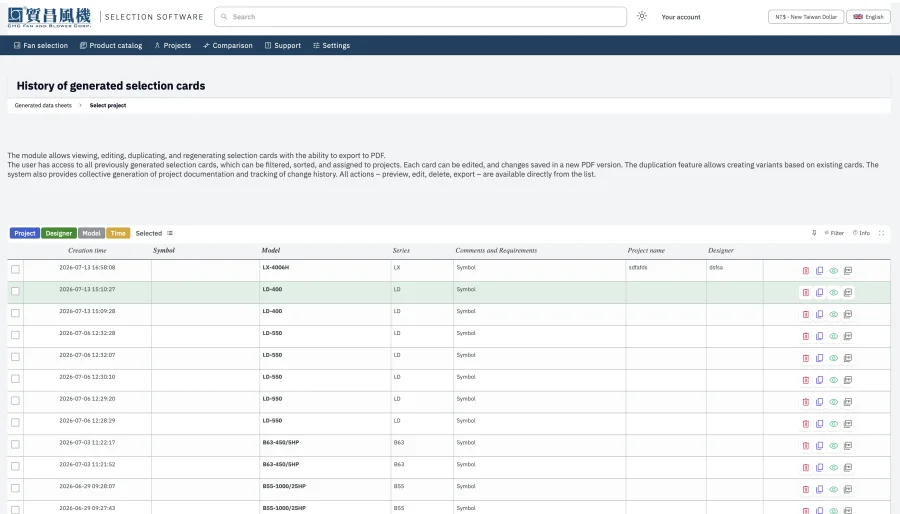
Once the data is structured and centralised, a datasheet stops being a document somebody maintains and becomes a rendering of the current record. Revision drift becomes structurally impossible rather than merely discouraged — there is no stored PDF to fall out of date, because the PDF is produced on request from live values.
Multilingual catalogs impose one important modelling rule: separate translatable text from language-independent data. Numeric values, unit codes and classification references must never be duplicated per language — 1,450 rpm is 1,450 rpm in every market. What does need translating is the narrative content (series overviews, application descriptions, accessory names) and the presentation labels and unit names around the numbers. Get this separation wrong and you multiply your maintenance burden by the number of languages you sell in; get it right and adding a market is a translation task, not a data-entry project.

PIM, BMEcat, ETIM, BIM and API integration
For manufacturers selling into Central and Northern European wholesale channels, this section is often the entire business case, because these formats are not optional — they are a condition of being listed.
BMEcat
BMEcat is an XML standard for exchanging product catalog data between suppliers and buyers, published by the German BME association. Versions 1.2 and 2005 are both still widely required in practice. A BMEcat file carries a header identifying the catalog, supplier and buyer, then a transaction — typically T_NEW_CATALOG for a full catalog, or T_UPDATE_PRODUCTS / T_UPDATE_PRICES for incremental updates — containing article records with their descriptive details, features, prices and references to images and documents.
ETIM
ETIM (European Technical Information Model) is the classification layer that usually travels with it. It defines a controlled vocabulary: product classes, the features that belong to each class, and permitted values and units — identified by stable codes rather than free text, so that a buyer's system can compare products across manufacturers without parsing prose. In practice, wholesalers ask for "BMEcat with ETIM classification", meaning a BMEcat file whose articles carry ETIM class and feature codes.
The critical implication for your data strategy is this: you can only produce a clean ETIM-classified export if your internal attributes map onto ETIM features. That mapping is done once and maintained centrally — which is a PIM function by definition. If your specifications live in spreadsheets whose columns change shape between product lines, there is nothing stable to map, and every export becomes a bespoke manual project.
BIM
Specifiers increasingly expect manufacturer objects they can place directly into a building model — IFC files (ISO 16739), native Revit families, or objects built to ETIM MC (Modelling Classes), which extends ETIM classification with standardised geometry and parameter definitions. These objects are downstream artefacts of the same product record: the dimensions, connection sizes, weights and performance parameters they carry should come from the PIM, not be modelled independently by a CAD contractor who will inevitably work from a snapshot.
API
Feed files serve wholesale; APIs serve everyone else. A JSON or XML API lets OEM customers embed your selection logic in their own configurators, lets distributors keep their portals synchronised without file transfers, and lets your own website query the catalog rather than maintain a copy of it. A DLL serves the same purpose for desktop software — an AHU manufacturer's in-house program selecting your fans directly, inside their own application.
Benefits for engineering, sales and marketing teams
The organisational effect is usually more noticeable than the technical one, because it removes a category of work rather than speeding it up.
- Engineering publishes test results once, into the record, and stops fielding "which curve is current?" enquiries. Measurement data flows from the laboratory to the catalog without being retyped, and every downstream figure inherits its reference conditions automatically.
- Sales quotes on live data and attaches a generated selection card to the offer without waiting on engineering. A quote can no longer be built on a superseded datasheet, because superseded datasheets no longer exist as circulating files.
- Marketing launches a series across every language and channel simultaneously, with consistent assets, instead of sequencing a catalog reissue behind a website update behind a translation round.
- Management gets demand data as a by-product: which categories are searched, which duty points return no match, where the range has gaps. Search terms that return nothing are the cheapest product-roadmap input a manufacturer can get.
How to prepare HVAC data for PIM implementation
Migration is where these projects succeed or stall, and the work that determines the outcome happens before any data is loaded. A practical sequence:
- Nominate one authoritative source per data type. Before migrating anything, decide which spreadsheet, which drawing set and which document library is the truth. If two disagree, resolve it now — a PIM will faithfully preserve whichever error you import.
- Normalise units and reference conditions. Convert everything to a single unit system internally and attach explicit density, speed, pressure convention and installation category to every performance figure. Data missing these cannot be validated or exported correctly.
- Define the attribute model before entering data. Decide which attributes belong to the series, which to the size, and which to the individual variant. Getting this wrong forces a re-import later.
- Separate stored values from derived ones. Migrate the measured inputs. Do not migrate calculated FEI, SFP or compliance verdicts — let the system compute them, so they update when methods or thresholds change.
- Digitise curves as data, not pictures. A scanned curve image is not product data. Curves need to arrive as point sets or coefficients with their speed and density stated, or the selection engine can do nothing with them.
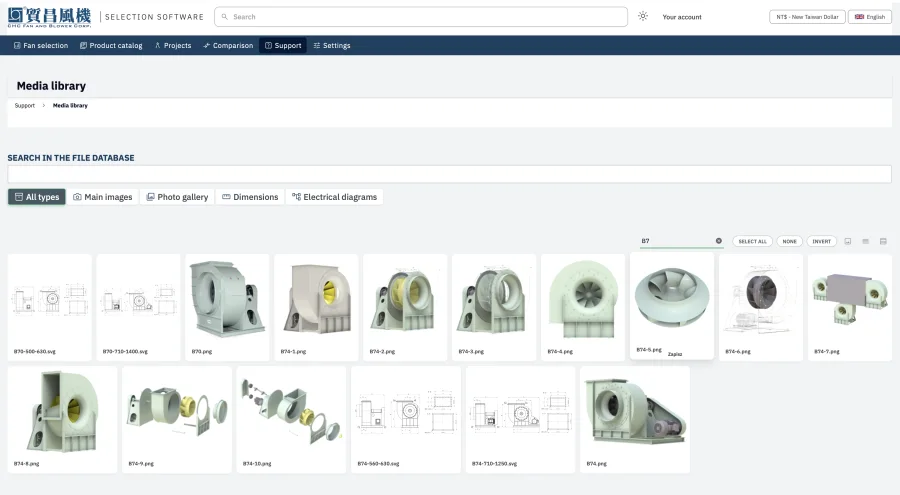
- Rationalise the asset library. One canonical image, drawing and certificate per product, consistently named, with obsolete revisions removed rather than archived alongside current ones.
- Decide language scope and translatable fields. Which markets, and which fields actually need translating — before commissioning any translation work.
- Map to ETIM early if you sell through wholesalers. Doing the classification mapping during the data model design is straightforward; retrofitting it after go-live means revisiting every product.
- Assign ownership. Name who may change a performance value and who approves it. A draft-and-review workflow with full change history makes this enforceable rather than aspirational.
From static product catalogs to a connected product ecosystem
The through-line of all of this is a change in what a catalog fundamentally is. In the traditional model, the catalog is a document — authored, laid out, printed or exported, and immediately beginning to age. Every other channel is a partial, manually maintained transcription of it.
In the connected model, the catalog is a queryable dataset, and the PDF, the website, the selection program, the wholesaler feed, the BIM object and the API response are all just views of it, rendered on demand. Publishing stops being an event that happens quarterly and becomes a continuous state. The question "is this data current?" stops being answerable only by asking a colleague, because there is exactly one place it can come from.
For a manufacturer, that is the difference between product data as a documentation burden and product data as sales infrastructure — something distributors, specifiers and OEM customers can build on directly.
Frequently asked questions
What is the difference between PIM and ERP?
An ERP manages transactions — stock, orders, costs, production and invoicing. A PIM manages product meaning — specifications, performance data, classifications, descriptions, translations and relationships. They overlap on identifiers such as article numbers, and typically exchange data, but an ERP is not designed to hold fan curves, octave-band sound data or multilingual technical descriptions.
Can a generic PIM handle fan and HVAC data?
Only partially. Generic platforms model products as scalar attributes, which cannot represent performance curves, per-octave-band acoustic arrays, or values that must be computed from a duty point rather than stored. They also lack the reference-condition context (air density, installation category, pressure convention) that makes HVAC performance data comparable at all.
What is BMEcat and do we need it?
BMEcat is an XML standard for exchanging catalog data between suppliers and buyers, widely used in European wholesale. If you sell through wholesalers in Germany, Austria, Switzerland, the Benelux or the Nordics, being able to deliver BMEcat — usually with ETIM classification — is frequently a condition of being listed rather than a competitive advantage.
How does ETIM classification relate to our own product attributes?
ETIM provides standardised class, feature, value and unit codes so buyers can compare products across manufacturers. Your internal attributes are mapped onto those codes once, in the PIM, and the mapping is then reused for every export. Without a stable internal attribute model there is nothing consistent to map.
Does a PIM replace our fan selection software?
No — it supplies it. The selection engine computes on the data the PIM holds: curves, limits, motor and drive data. Ideally both run on the same database, so a selection result can never be computed from data that differs from what the catalog and datasheets publish.
How long does a PIM implementation take for a fan manufacturer?
The data preparation usually takes longer than the software configuration. Where technical data already exists in a consistent structured form, catalogs typically go live in weeks; where it has to be consolidated from mixed sources and curves digitised from documents, the migration work dominates the timeline.
If you are weighing up whether your product data belongs in a spreadsheet or a system, the honest test is simple: pick a performance value, and try to establish who last changed it, when, and which channels are still publishing the previous one. If that takes more than a minute, the data has already outgrown the tooling. You can see how we structure this for fan and HVAC manufacturers on our PIM software for HVAC manufacturers page, or how the same database drives customer-facing selection in fan selection software.